How to Recover a BeatViz Workflow 2.0 Studio Draft
A Studio task is created when you select Start Creating. After that, you can leave and return. Work before that click is only a start-form draft on /create, not a Studio task in Drafts.
Where Studio drafts live
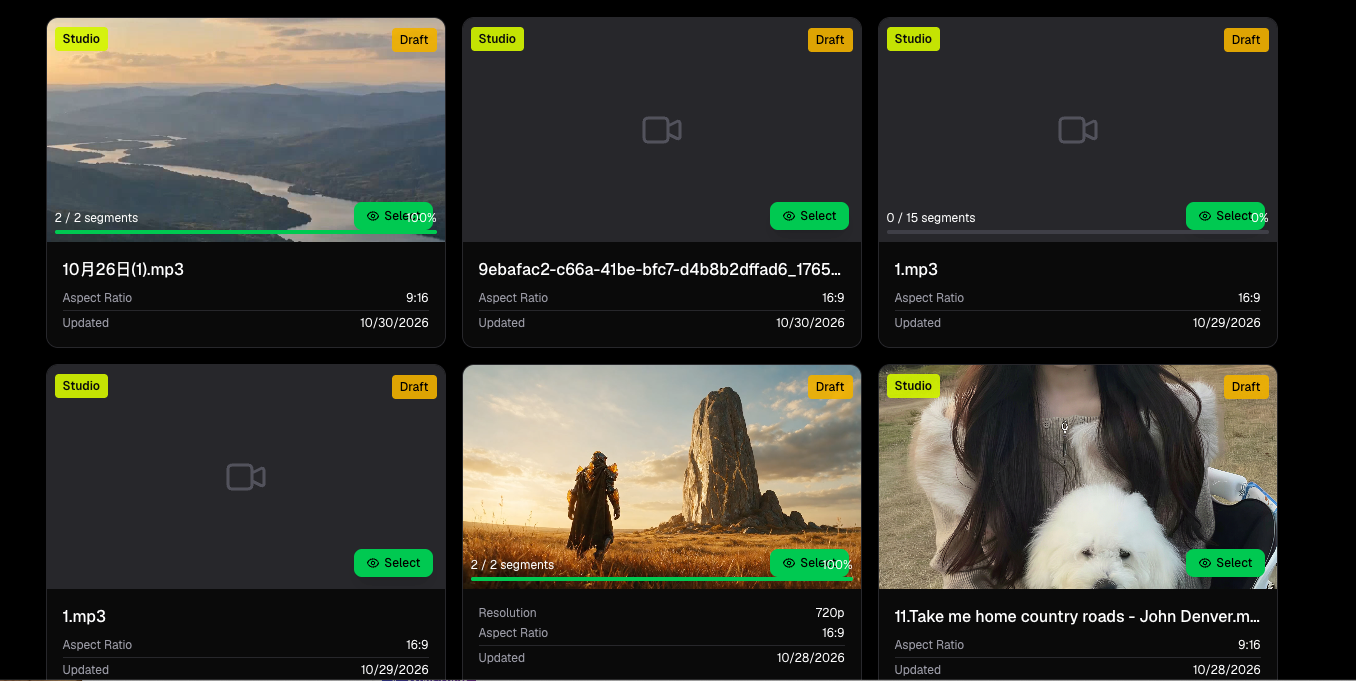
Open Drafts. Workflow 1.0 and Workflow 2.0 tasks share the Workflow list. Studio cards show a Studio badge. Click a Studio card to open /create-2/[taskId].
Recent projects on /create also list Studio tasks and open the same workspace.
Exported Studio videos appear on All and Videos → Workflow with the Studio pill. Playing one uses the in-app viewer. Deleting it removes the whole task, including the draft.
What you can resume
The workspace restores the current step's data:
- Music Analysis — saved lyrics and settings. Analysis does not auto-restart when lyrics already exist.
- Storyboard — the selected board, clip text and cuts.
- Keyframe — bound opening frames. In-flight image jobs keep running; return to Keyframe to poll them.
- Video — ready clips and in-flight MiniMax jobs. Entering Video does not enqueue missing clips.
Header Credit Usage shows what this task already spent.
Refresh usually lands on Music Analysis. Use the step rail to go back to Storyboard, Keyframe or Video. Steps unlock when their inputs are ready (analysis for Storyboard, a board for Keyframe, opening frames for Video).
What cannot be resumed
- Audio trim and aspect ratio from a start form you never submitted with Start Creating.
- Caption table edits that were never persisted into analysis.
- A Workflow 1.0
taskIdopened as Studio, or the reverse. - Image or video jobs that failed after you left; retry those clips explicitly.
Delete a Studio task
On Drafts or the Videos list, delete removes the Studio task and its child analysis, storyboard, frames and videos. This cannot be undone from the help center. Export files already downloaded to your device stay on your device.
FAQs
Why don't I see my work in Drafts?
The Studio task is created only after Start Creating succeeds. If you stayed on /create without that click, there is no /create-2 task to reopen. Also confirm you are looking at Workflow Drafts, not Editor projects.
Does reopening a draft charge credits?
No. Credits are charged when you run analysis retry, Generate Scenes, keyframe jobs or video jobs again.
Continue learning: ← Previous: Credits & Costs · Next: Export Your Video →
Related guides
Try BeatViz Workflow 2.0
Upload a song, choose Studio Create · 2.0, and move through Music Analysis, Storyboard, Keyframes, and MiniMax clips.