BeatViz Workflow 2.0 Credits: When You Pay and How to Estimate Costs
Workflow 2.0 bills in stages. The estimate next to Start Creating is not charged all at once. Analysis, scenes, opening frames and MiniMax clips each have their own charge. Open Credit Usage in the workspace header for this task's ledger.
Treat the in-product estimate as authoritative if rates change after this guide.
When does Workflow 2.0 charge credits?
| User action | Credit behavior |
|---|---|
| Start Creating | Charges 2 credits for Music Analysis. The pipeline number on the button is only an estimate. |
| Reopen a task that already has lyrics | 0. Analysis is reused. |
| Generate Scenes / Regenerate Scenes | 12 credits on a new run. Reuse of a valid board is 0. |
| Generate Keyframes (full song) | 6 credits for video + frame prompts, then 3 credits per opening frame with GPT Image 2.5. |
| Retry / Edit Image (one still) | 3 credits (GPT Image 2.5, Nano Banana 2.1) or 5 credits (Seedream 5.0, Nano Banana Pro). No extra 6-credit prompt pack. |
| Replace a frame or video from history | 0 |
| Generate Videos / per-clip Generate | MiniMax H3 Max: 20 credits/s at 768P, 40 credits/s at 1080P, billed on the integer duration sent (5–15s). |
| Export | 0 extra compose credits |
A job that never starts because you have insufficient credits is not charged. Failed MiniMax or opening-frame jobs that already charged are refunded.
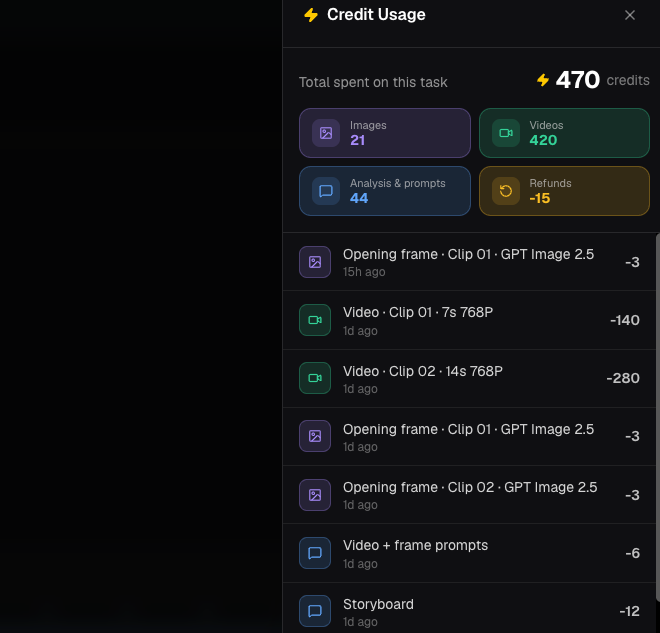
Image costs
First Generate Keyframes uses GPT Image 2.5 at 3 credits per clip still, after the 6-credit prompt pack.
| Image model | Credits per still |
|---|---|
| GPT Image 2.5 | 3 |
| Nano Banana 2.1 | 3 |
| Seedream 5.0 | 5 |
| Nano Banana Pro | 5 |
Video credit rates
| Resolution | Credits per billed second | 5 s clip | 8 s clip | 10 s clip |
|---|---|---|---|---|
| 768P | 20 | 100 | 160 | 200 |
| 1080P | 40 | 200 | 320 | 400 |
A storyboard clip shorter than 5 seconds is still sent to MiniMax as 5 seconds and billed as 5 seconds. A 4.8 s clip at 768P costs 100 credits, not 96.
Example: a 24-second Studio video at 768P
The planner aims near 8-second clips, so 24 seconds is typically three clips:
- Music Analysis: 2
- Storyboard: 12
- Keyframe prompts: 6
- Opening frames: 3 × 3 = 9
- Video: 3 × 8 × 20 = 480
- Illustrative total: 509 credits, assuming no regeneration, 768P, and no 1080P upgrade.
The 2 analysis credits are charged at Start Creating. The 12 storyboard credits are charged at Generate Scenes. Frame and video credits are charged at those later buttons.
How to estimate a different song length
- Divide the selected duration by about 8 seconds and round up for a clip count (clips never exceed 15 seconds).
- Add 2 (analysis) + 12 (storyboard) + 6 (keyframe prompts).
- Add 3 × clip count for GPT Image 2.5 opening frames.
- For each clip, multiply billed seconds (at least 5, ceil of clip length, max 15) by 20 (768P) or 40 (1080P).
- Add regeneration attempts.
The /create Studio button uses this kind of 768P pipeline estimate for the selected waveform range.
FAQs
Do I pay for the whole song when I click Start Creating?
No. That click charges 2 credits for Music Analysis. Later stages charge when you generate scenes, keyframes and videos.
Are draft tasks billed again when I reopen them?
Reopening a Studio draft does not charge. You pay again only when you retry analysis, regenerate scenes, generate new stills or generate new video.
Continue learning: ← Previous: Keep Characters Consistent · Next: Recover Drafts →
Related guides
Try BeatViz Workflow 2.0
Upload a song, choose Studio Create · 2.0, and move through Music Analysis, Storyboard, Keyframes, and MiniMax clips.