Standard vs Pro vs Premium: BeatViz Workflow Video Models and Quality
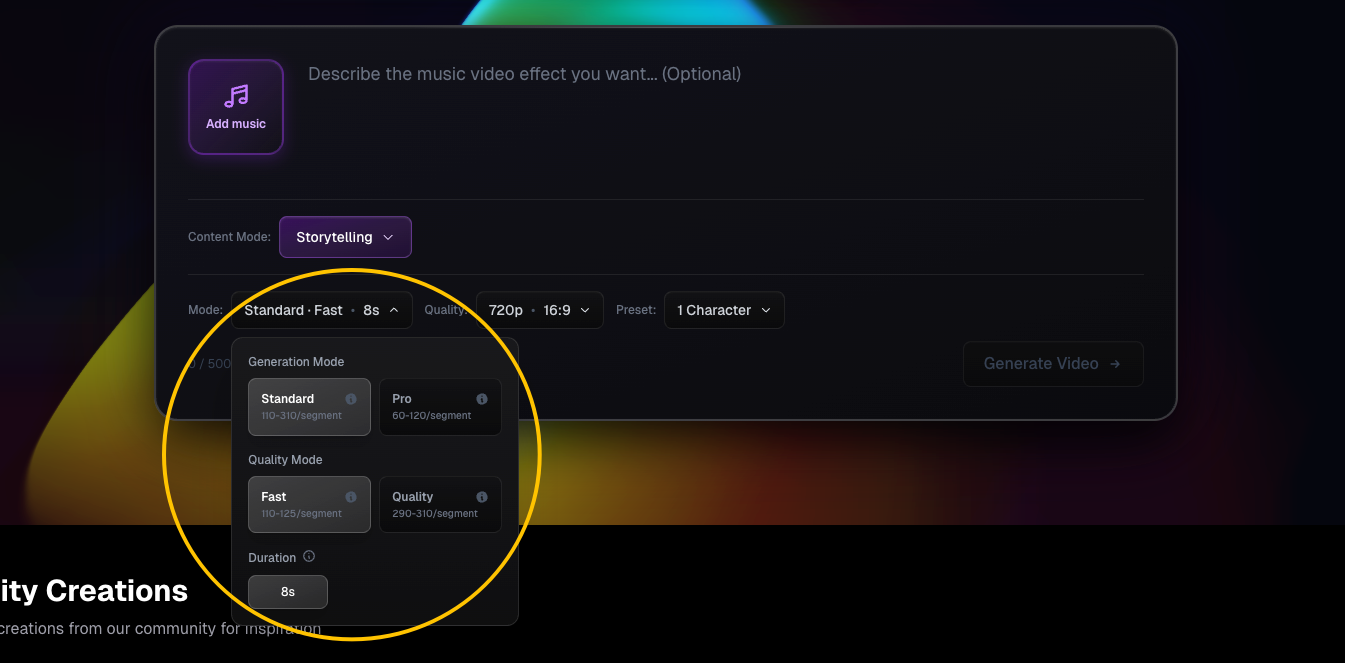
The Mode selector in Workflow has three tiers: Standard, Pro and Premium. They use different generation models and support different clip durations and resolutions. This is separate from Content Mode (Storytelling, Singing, Dancing or Abstract).
Compare Workflow generation modes
| Mode | Video model | Supported clip duration | Resolution | Aspect ratio |
|---|---|---|---|---|
| Standard | Veo 3.1 | 8 seconds | 720p or 1080p | 16:9 or 9:16 |
| Pro | Kling 2.6 | 5 or 10 seconds | 1080p | 16:9 or 9:16 |
| Premium | MiniMax H3 | 5, 8 or 10 seconds | 768p or 2K | 16:9 or 9:16 |
Standard also offers Fast and Quality options. The Quality option has a substantially higher per-clip credit cost; it is not the same as simply switching Standard's resolution. In Singing, Standard 1080p is unavailable.
Free users can use Standard. Pro, Premium and gated higher-resolution choices prompt an upgrade for free users. Paid users' initial defaults are Pro, 5 seconds and 1080p. Mode selections may be remembered in your browser.
How clip length changes the number of scenes
Workflow divides the selected audio into consecutive segments using your selected clip length. For a 24-second audio selection:
- Standard, 8 seconds: 3 scenes.
- Pro, 5 seconds: 5 scenes, with a shorter last scene.
- Premium, 10 seconds: 3 scenes, with a shorter last scene.
A final partial scene still uses one full clip generation charge. For longer music videos, clip duration therefore affects both how many scenes you receive and how many credits you spend.
Image models used for the first frames
The initial first-frame generator is selected for you based on your video tier:
- Standard: Nano Banana 2 at 3 credits per scene.
- Pro / Premium: Seedream 5 Pro at 5 credits per scene.
You do not separately select the first-frame model in Workflow setup. First-frame credits are charged only when the system generates the first frames, after the storyline is confirmed.
Current video credit rates (excluding lip sync)
| Tier | Video clip | Video credits per clip |
|---|---|---|
| Standard Fast | 8 s, 720p | 35 |
| Standard Fast | 8 s, 1080p | 45 |
| Standard Quality | 8 s, 720p | 215 |
| Standard Quality | 8 s, 1080p | 230 |
| Pro | 5 s, 1080p | 60 |
| Pro | 10 s, 1080p | 120 |
| Premium | 5 / 8 / 10 s, 768p | 90 / 144 / 180 |
| Premium | 5 / 8 / 10 s, 2K | 150 / 240 / 300 |
These values describe the current product configuration documented for this guide. The in-product estimate is the reference to check before charging credits, especially if settings or pricing change.
Which tier should you pick?
Choose Standard Fast when you want to test a direction at a lower video-generation cost. Choose Pro when you want its 5- or 10-second 1080p generation route. Choose Premium when you specifically want its 768p or 2K options. Stronger character continuity is helped by clear character references and first frames; no tier alone guarantees perfect identity across scenes.
FAQs
Can Standard create 5-second video clips?
No. In Workflow, Standard is an 8-second clip mode.
Can I change the video model after beginning a task?
The creation settings are carried with the task and are not adjustable later in the Workflow generator. Choose the tier before beginning.
Is the credit estimate charged when I click Generate Video?
No. That click checks first-frame credit availability. First frames and then videos are charged at later steps. Read Credits & Costs.
Continue learning: ← Previous: Choose a Content Mode · Next: Add Characters →
Related guides
Try BeatViz Workflow
Upload a song, choose a Content Mode, and let Workflow plan scenes, first frames, and clips for you.