6 Best AI Music Video Generators for Creators in 2026
The best AI music video generator should do more than turn a prompt into a few attractive clips. It should understand the song, organize visuals around its structure, support scene-level changes, and produce a video that is practical to publish.
In 2026, creators can choose between complete song-to-video platforms, audio-reactive animation tools, template-based visualizers, lyric video makers, and general AI video systems. This guide compares six leading options and explains which workflow is best for musicians, AI music creators, producers, labels, and social media teams.
Disclosure: BeatViz publishes this comparison and is included in the list. Rather than naming one universal winner, we compare the tools by their intended workflows, published features, creative control, and suitability for different music projects.
Quick Verdict: What Is the Best AI Music Video Generator?
BeatViz is the best option for creators who want a complete, music-first workflow, including song analysis, creative planning, scene generation, beat synchronization, regeneration, and timeline editing in one platform.
However, the right choice depends on what you are making:
- •Best for a complete AI music video workflow: BeatViz
- •Best for detailed audio-reactive animation: Neural Frames
- •Best for fast automatic music videos: Freebeat
- •Best for experimental visual styles: Kaiber
- •Best for stock-footage and lyric videos: Rotor Videos
- •Best for template-based music visualizers: Videobolt
Before comparing individual platforms, it helps to understand what an AI music video generator is and how it differs from a general AI video generator or music visualizer.
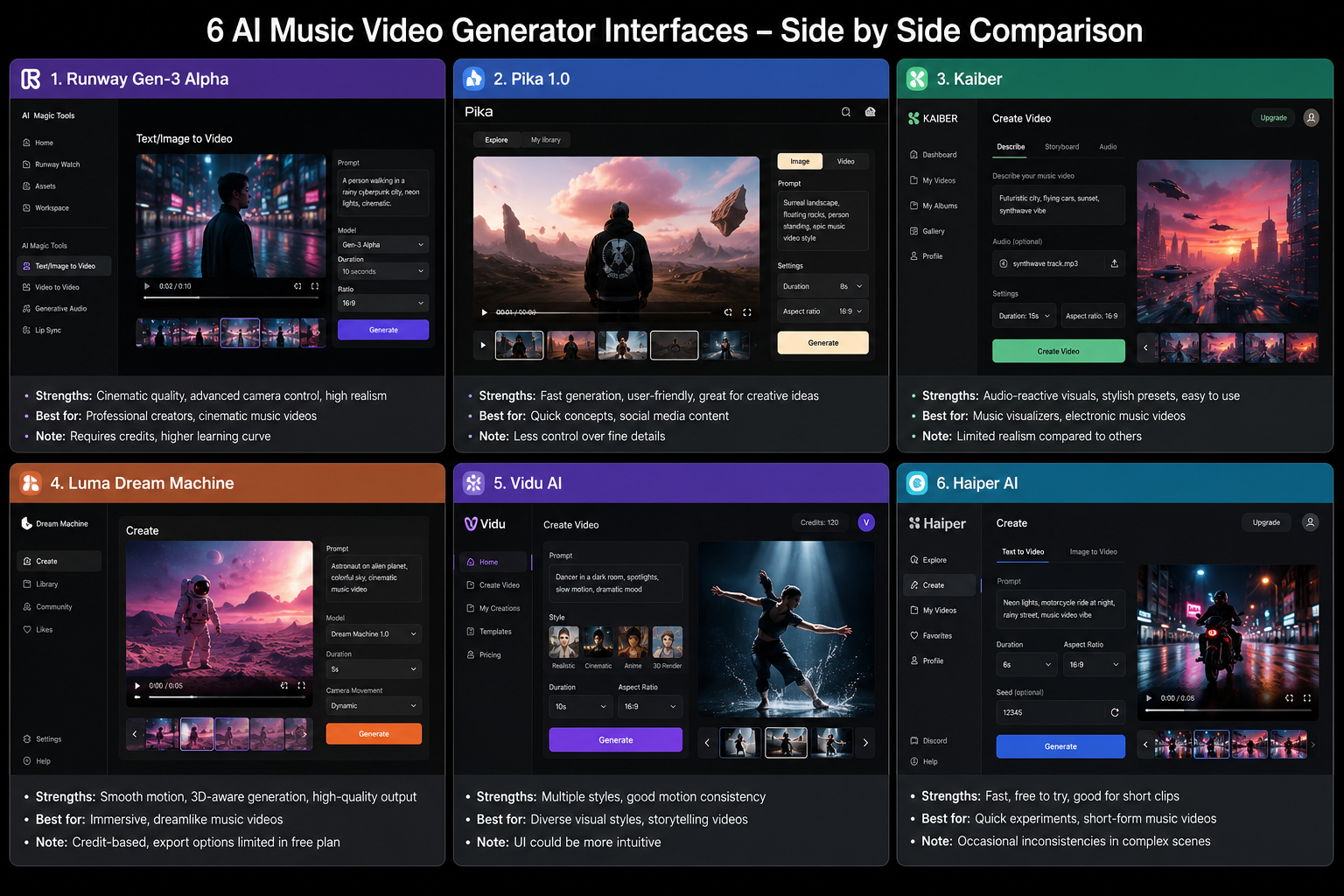
Best AI Music Video Generators Compared
| Tool | Best For | Main Music Workflow | Pricing Approach | Main Limitation |
|---|---|---|---|---|
| BeatViz | Complete AI music videos | Upload a song, generate concepts and scenes, edit segments, and export | Credit-based subscriptions | More features than creators needing only a simple visualizer may require |
| Neural Frames | Audio-reactive animation | Analyze musical stems and connect visual motion to different audio elements | Freemium and paid subscriptions | Advanced controls can require more learning |
| Freebeat | Fast automatic generation | Upload audio or add a music link and generate beat-synced videos | Free and credit-based paid plans | Lower plans may have export-resolution limitations |
| Kaiber | Artistic experimentation | Use Canvas, Beat Sync, and Editor to create stylized music visuals | Credit-based plans | Full-song projects may require more manual creative assembly |
| Rotor Videos | Stock and lyric videos | Combine music with selected or library footage and automatic editing | Non-expiring credit bundles | Relies more on existing footage than original AI-generated scenes |
| Videobolt | Visualizers and templates | Customize music visualizer, lyric, and promotional video templates | Free and paid subscriptions | Less suitable for narrative scene generation |
Pricing and features can change frequently. At the time of review, BeatViz listed paid annual plans beginning at $20.70 per month, Neural Frames offered freemium and paid plans, and Freebeat listed a $4.99 weekly Basic option and monthly Pro option. Kaiber uses Canvas, Beat Sync, and Editor workflows, Rotor sells non-expiring credit bundles, and Videobolt offers free and paid export tiers. Always check the live pricing page before purchasing.
How We Evaluated the Tools
Not every product on this list solves the same problem. Some generate original AI scenes, while others arrange stock footage or animate templates. We therefore evaluated the tools according to seven practical criteria.
1. Music-first workflow
A music video generator should allow the song to guide the project. We looked for audio upload, rhythm analysis, mood detection, musical structure analysis, or other features that connect visuals to the track.
2. Beat and energy synchronization
Visuals should respond to changes in rhythm, energy, phrasing, or song sections. A video can contain beautiful footage and still feel disconnected if every transition happens randomly.
3. Creative control
Creators should be able to change weak scenes, update prompts, control visual styles, replace footage, or edit the timeline without restarting the entire project.
4. Full-video capability
Many general AI video tools create individual clips. A dedicated AI music video generator should help assemble those clips into a longer, structured project.
5. Ease of use
A tool may be powerful but unsuitable for a musician who has never used professional editing software. We considered how quickly a new user can move from a song to a usable result.
6. Publishing options
Useful tools should support common formats for YouTube, TikTok, Instagram Reels, and YouTube Shorts. Aspect-ratio control and export quality are especially important for creators repurposing one song across several platforms.
7. Cost and regeneration
The first generation is rarely perfect. We considered not only subscription pricing but also whether users may need credits for regenerating scenes, changing styles, removing watermarks, or exporting higher-resolution versions.
1. BeatViz: Best for a Complete Music-First Workflow
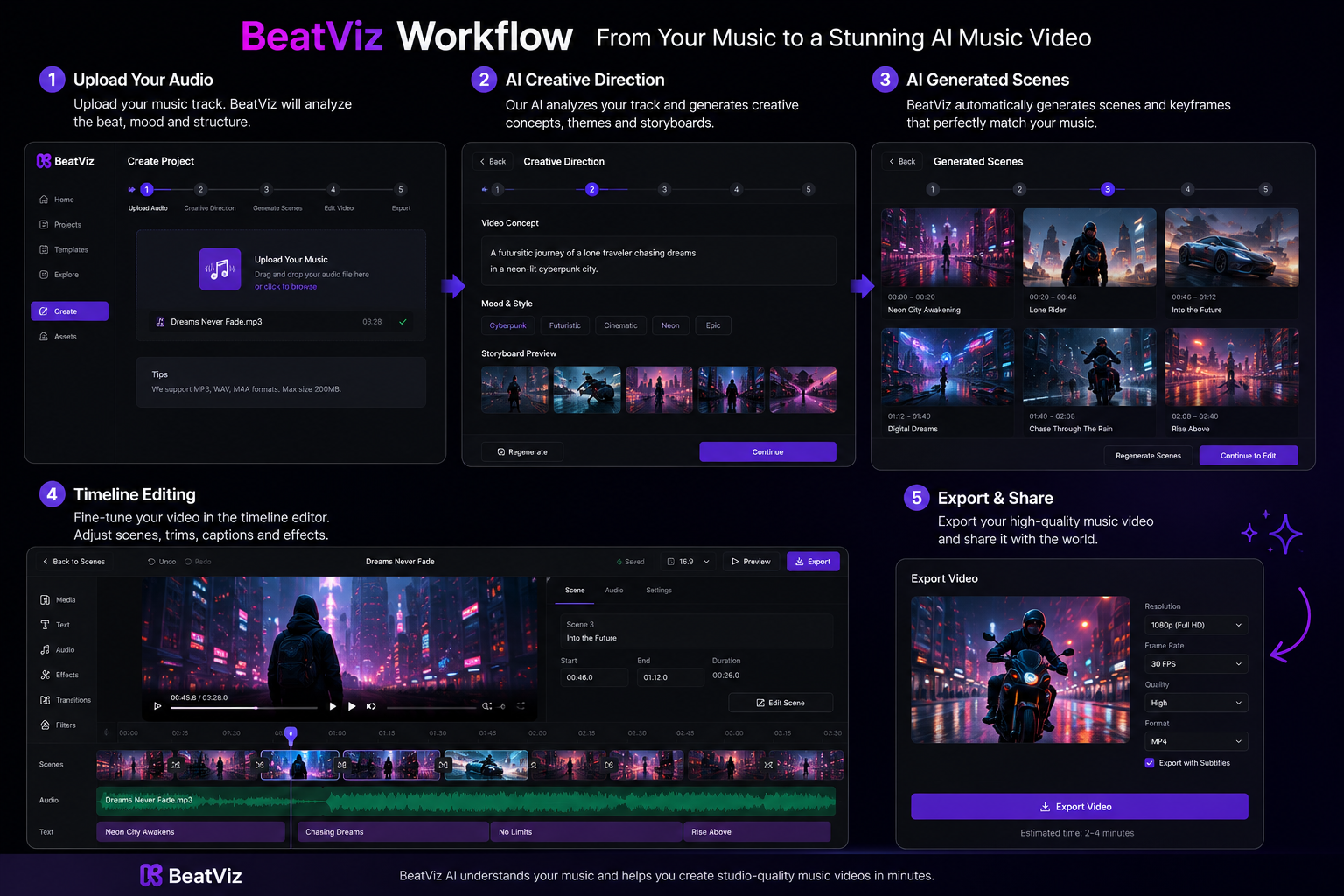
BeatViz is designed specifically around the process of turning music into a complete video rather than generating unrelated clips one at a time.
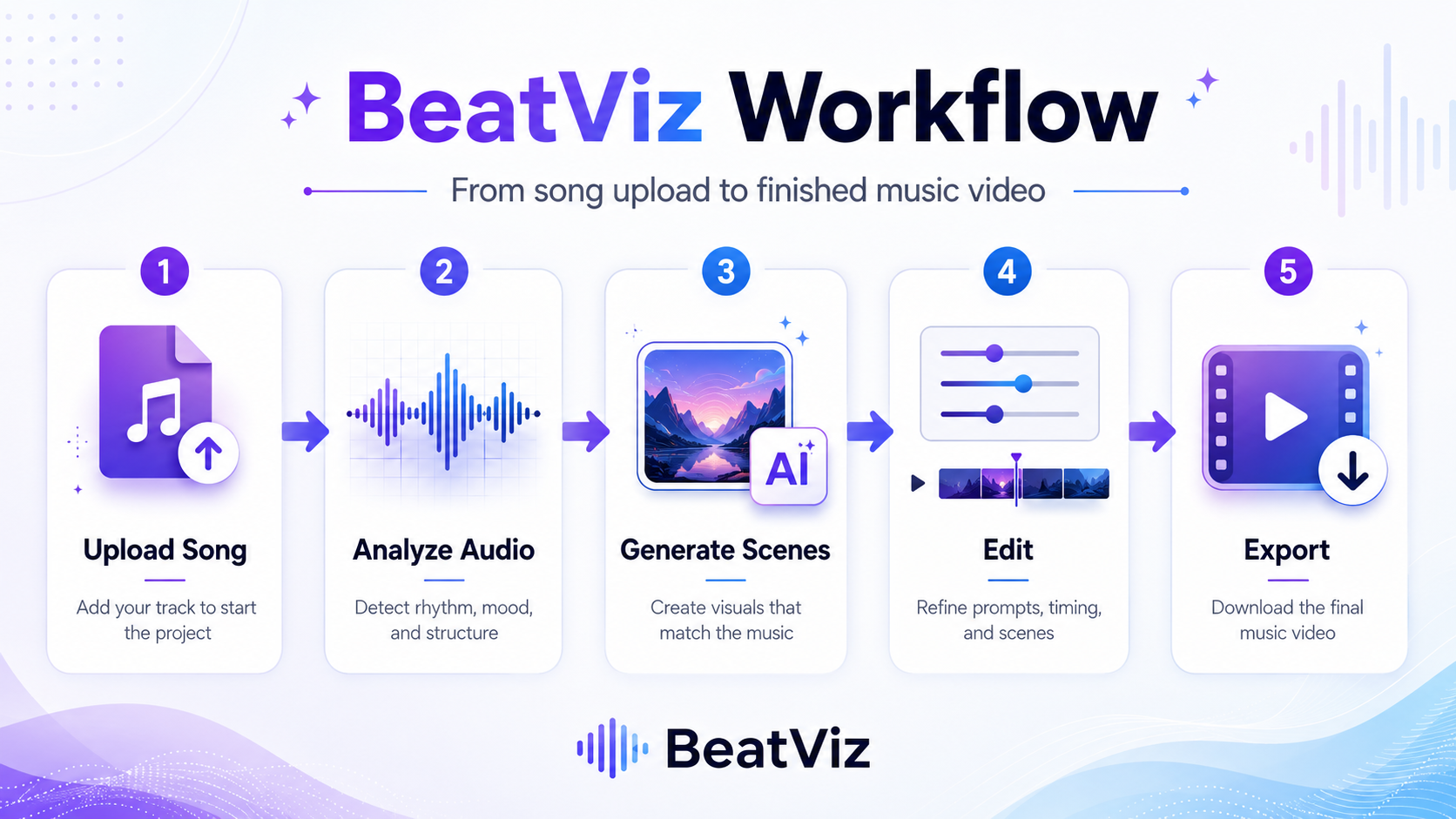
Creators can upload a song and use an automated workflow that analyzes the music, develops a visual direction, generates scenes, and synchronizes the result with the soundtrack. For users who want more control, BeatViz also provides an AI Director Agent and a timeline-based Custom Editing Studio.
This combination is its main advantage. A beginner can start with a faster automated workflow, while an experienced creator can work scene by scene, rearrange clips, regenerate individual sections, and refine the final timeline.
BeatViz also brings multiple video models into the same platform. This allows users to experiment with different visual qualities and styles without managing separate subscriptions and moving files between several tools. Its current product pages describe access to models such as Veo, Luma, Pika, and Kling, although model availability may change over time.
What BeatViz does well
BeatViz is particularly strong when the creator already has a finished track and wants to build a visual identity around it. The workflow supports cinematic narratives, character-based videos, lyric-friendly scenes, abstract visuals, and shorter promotional edits. It also supports 16:9, 9:16, and 1:1 exports, making it possible to plan versions for YouTube, TikTok, Reels, and other platforms. Current paid plans include 1080p export, commercial-use rights, and watermark-free output.
Where BeatViz may not be the best fit
BeatViz uses a credit-based system, so creators who repeatedly regenerate many clips should monitor project costs. Users who only need a waveform placed over album artwork may also find a simple visualizer faster.
Best for: Musicians, AI music creators, independent artists, labels, agencies, and creators who want a complete song-to-video workflow.
Ready to Create Your AI Music Video?
Turn your track into a complete visual project with BeatViz — music analysis, scene generation, beat sync, and timeline editing all in one place.
Start Creating →2. Neural Frames: Best for Detailed Audio-Reactive Animation
Neural Frames is one of the strongest choices for creators who want visuals to respond closely to individual parts of a song.
Its music video system analyzes multiple audio stems, such as drums, bass, and vocals. Creators can then connect visual parameters to those musical elements. For example, motion could react to the kick drum while another visual property changes with the vocals. The platform also offers an Autopilot workflow for users who do not want to configure every parameter manually.
What Neural Frames does well
Neural Frames is especially suitable for electronic music, ambient tracks, experimental visuals, psychedelic animation, and projects where audio reactivity is more important than traditional storytelling. Its deeper controls can help an artist create motion that feels connected to specific musical elements rather than applying one general effect to the entire track.
Where Neural Frames may not be the best fit
The amount of control can introduce a learning curve. Creators who want to upload one song and immediately receive a complete narrative video may prefer a more guided workflow. Its strengths also lean toward animated, audio-reactive, and generative visual production. Artists seeking a conventional sequence of realistic performance and story scenes should review examples carefully before choosing a plan.
Best for: Electronic musicians, visual artists, experimental creators, and users who need advanced audio-reactive control.
3. Freebeat: Best for Fast Automatic Music Videos
Freebeat focuses on speed and accessibility. Users can upload a local audio file or start from a supported music link, then generate a music video based on the track's rhythm, mood, and energy.
The platform promotes several output types, including cinematic music videos, dance videos, lyric videos, and social media content. It also offers several aspect ratios. Freebeat currently provides access to multiple generation models and offers a credit-based pricing structure, with a low-cost weekly option for creators who want to test the platform for a specific release.
What Freebeat does well
The main advantage is its low-friction workflow. It is appropriate for users who prioritize speed over detailed editing and do not want to build every scene manually. It is also useful for short-form promotion. A musician can use the same song to generate dance-oriented content, lyric-focused videos, and vertical social clips.
Where Freebeat may not be the best fit
Creators should check the export limits of the plan they choose. The current Basic and Pro plan information specifies output up to 720p, so users requiring 1080p or higher should verify which plan provides the necessary resolution. Automated generation can also provide less precise control than a scene-by-scene timeline workflow.
Best for: Beginners, social media creators, dance-video creators, and musicians who want fast results.
4. Kaiber: Best for Experimental and Artistic Visual Styles
Kaiber is built around creative exploration. Its current music-oriented workflow combines Canvas for visual creation, Beat Sync for connecting visuals to music, and an Editor for polishing the result.
Rather than functioning only as an automatic song-to-video service, Kaiber gives creators a broader visual workspace. This makes it attractive to artists who want to transform artwork, images, prompts, and existing footage into stylized motion.
What Kaiber does well
Kaiber is particularly effective for surreal animation, evolving artwork, album-cover motion, abstract sequences, and visually distinctive promotional clips. Its modular environment can be useful when the artist already has a strong visual concept. Instead of asking the system to invent the entire project, the creator can develop individual visual ideas and combine them into a music-synced sequence.
Where Kaiber may not be the best fit
Creative flexibility can require more manual direction. A complete three-minute narrative video may involve generating, selecting, and arranging multiple visual sections. Creators looking for an automatic system that analyzes a song, writes a complete visual concept, generates every scene, and assembles the final timeline may find a more guided music video platform easier.
Best for: Visual artists, experimental musicians, designers, and creators with a defined artistic direction.
5. Rotor Videos: Best for Stock-Footage and Lyric Videos
Rotor Videos takes a different approach from fully generative platforms. Instead of generating every visual from scratch, it analyzes the song and automatically edits selected footage or clips from its media library.
This can be an advantage when creators prefer the predictability of real footage. Rotor can produce music videos, lyric videos, promotional videos, Spotify Canvas-style assets, and other release content without requiring traditional editing skills. The platform uses credit bundles rather than a standard unlimited subscription.
What Rotor Videos does well
Rotor is a practical option for artists who want a polished result but do not need original AI-generated characters or cinematic worlds. The library-based workflow can be more predictable than generative video, and the system handles much of the timing and editing. It is also useful for lyric videos because the platform can align supplied lyrics with the music automatically.
Where Rotor Videos may not be the best fit
Because Rotor relies heavily on selected or library footage, the result may feel less unique than a video built from original generative scenes. Users can select styles and footage, but they cannot necessarily describe an entirely new character, location, or fictional world and have the platform generate it from scratch.
Best for: Independent artists who want reliable stock-based edits, lyric videos, and quick release assets.
6. Videobolt: Best for Template-Based Music Visualizers
Videobolt is a browser-based video creation platform with a large collection of customizable templates. Its music-related options include visualizers, lyric videos, album promotions, intros, and other social media assets.
Unlike a complete generative music video platform, Videobolt is most useful when the creator already knows the visual format they want. Users choose a template, upload their music and artwork, customize the text and design, and render the result. The free plan supports watermarked exports at up to 540p, while paid tiers increase resolution up to 4K.
What Videobolt does well
Templates provide predictability. A creator can see the general design before rendering and does not need to rely on an AI model interpreting a complex prompt. Videobolt is therefore a strong choice for waveform videos, spectrum animations, audio-reactive backgrounds, album announcements, and branded channel uploads. Its unlimited-export paid options may also benefit creators publishing many similar videos.
Where Videobolt may not be the best fit
Videobolt is not primarily designed to create a narrative AI music video with original characters, evolving locations, and generated cinematic scenes. A template visualizer can make an audio upload more engaging, but it does not provide the same storytelling range as a scene-based AI music video generator.
Best for: Producers, beat channels, record labels, YouTube music channels, and creators who need repeatable visualizer templates.
Best AI Music Video Generator by Use Case
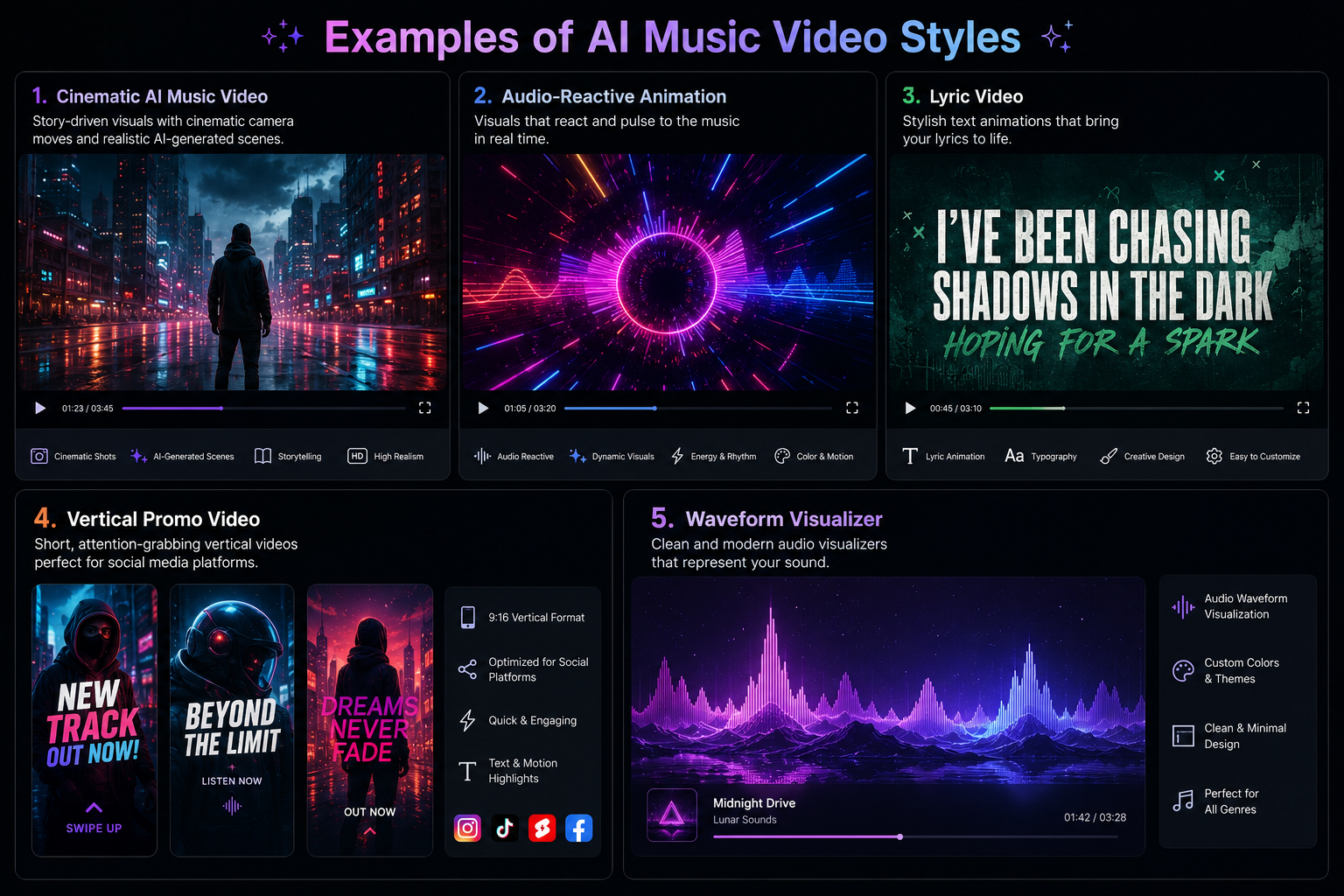
The best platform depends on the type of video you need, not simply which tool has the longest feature list.
Best for musicians creating a complete music video: BeatViz
BeatViz covers more of the production process in one environment. It can help plan a concept, generate individual scenes, synchronize the visuals, revise weak sections, and arrange the result in an editor. This makes it suitable for official music videos, cinematic lyric videos, story-based releases, and multi-scene projects.
Best for audio-reactive visuals: Neural Frames
Choose Neural Frames when the relationship between individual audio elements and visual motion is the priority. Its stem-based controls are particularly valuable for electronic, ambient, and experimental music.
Best for quick social media content: Freebeat
Freebeat is appropriate when speed matters more than detailed scene editing. It can help creators turn songs into dance videos, lyric content, and vertical promotional clips with relatively little setup.
Best for artistic experimentation: Kaiber
Kaiber is a strong creative environment for musicians who already have artwork, visual references, or a clear experimental direction.
Best for footage-based music videos: Rotor Videos
Rotor is the most suitable option in this group when a creator prefers real stock footage and automatic editing instead of completely generated visuals.
Best for simple visualizers: Videobolt
Videobolt is a practical choice for waveform videos, spectrum animations, album artwork videos, and repeatable YouTube uploads.
How to Choose the Right AI Music Video Generator
Before subscribing, begin with the type of final asset you need.
Choose the required level of storytelling
A visualizer only needs to make the audio visually active. A complete music video may require characters, locations, visual continuity, multiple scenes, and an emotional arc. Do not pay for an advanced narrative workflow when a waveform is enough. At the same time, do not choose a simple template tool if the song requires a cinematic story.
Decide how much control you need
Automatic tools are faster, but more control usually means more decisions. Consider whether you need to:
- •Regenerate one scene without changing the entire video
- •Keep a character visually consistent
- •Change prompts for specific song sections
- •Rearrange clips on a timeline
- •Upload reference images
- •Produce multiple aspect ratios
For important releases, scene-level editing can be more valuable than the speed of the first generation.
Calculate the cost of revisions
The advertised subscription price is not always the complete project cost. Check whether the tool charges for:
- •Generating scenes
- •Regenerating failed or weak clips
- •Extending video length
- •Removing watermarks
- •Increasing resolution
- •Using premium models
- •Exporting the final video
A low starting price may not be the lowest total price if the project requires many revisions.
Review the commercial-use terms
Musicians releasing monetized videos should confirm whether their plan includes commercial-use rights. They should also own or have permission to use the uploaded song, lyrics, images, logos, and reference materials. AI video generation does not remove the creator's responsibility to use source materials legally.
Test the tool with your own song
Demo videos show what a platform can produce under favorable conditions. Your track may have a different structure, genre, tempo, or visual concept. Before purchasing a large plan, test one chorus or short section. Evaluate whether the tool understands the mood, handles transitions well, and gives you enough control to repair weak results.
Final Verdict
There is no single AI music video generator that is best for every creator.
Neural Frames offers deep audio-reactive control. Freebeat prioritizes fast automatic generation. Kaiber provides an experimental visual workspace. Rotor Videos creates dependable edits from stock or selected footage. Videobolt is a practical choice for reusable visualizer templates.
BeatViz is the strongest overall option for creators who want a complete music-first production workflow. It connects music analysis, creative planning, scene generation, beat synchronization, model selection, regeneration, timeline editing, and multi-format export in one platform.
The most important question is not which tool can create the most visually impressive five-second clip. It is which tool can take your actual song from audio upload to a coherent, publish-ready video.
Ready to turn your track into a complete visual project? Create an AI music video with BeatViz.
Frequently Asked Questions
What is the best AI music video generator in 2026?
BeatViz is one of the best choices for complete music video production because it combines music analysis, creative planning, AI scene generation, beat synchronization, and timeline editing. Neural Frames is better for advanced audio-reactive animation, while Freebeat is suitable for fast automatic generation.
Can AI generate a full music video from a song?
Yes. Music-first platforms can analyze an uploaded song, generate a visual concept, create multiple scenes, synchronize the footage, and assemble a longer video. However, creators should still review the scenes and regenerate any sections that do not match the song.
What is the difference between an AI music video generator and a music visualizer?
An AI music video generator can create scenes, characters, locations, stories, and lyric-related visuals. A music visualizer usually creates waveforms, spectrum animations, particles, or looping graphics that react to the audio.
Can I make an AI music video for free?
Several platforms offer free accounts, previews, or limited generation credits. Free output may include watermarks, lower resolution, shorter duration, or restricted models. A complete watermark-free music video normally requires a paid plan or additional credits.
Which AI music video generator is best for YouTube?
BeatViz is suitable for creators who need a complete 16:9 music video with multiple generated scenes. Rotor Videos works well for footage-based videos and lyrics, while Videobolt is a practical option for YouTube visualizers and repeatable channel uploads.
Which tool is best for TikTok, Reels, and YouTube Shorts?
Freebeat is useful for quickly producing automatic vertical content. BeatViz is more suitable when the creator wants to develop a custom visual concept and produce both vertical promotional clips and a longer official video from the same song.
Can I use AI-generated music videos commercially?
Commercial use depends on the platform, subscription plan, models, and source materials. Review the current licensing terms and confirm that you have permission to use the song, lyrics, reference images, logos, and any uploaded footage.
Do I need video-editing experience?
No. Most tools on this list are designed for users without professional editing experience. However, learning basic concepts such as aspect ratio, scene continuity, visual prompting, and song structure can significantly improve the final result.
Ready to Create Your AI Music Video?
Turn your track into a complete visual project with BeatViz — music analysis, scene generation, beat sync, and timeline editing all in one place.
Start Creating →