New Guide for AI Music Video Generator (Dec 24, 2025)
3 New Video Models Now Available in BeatViz Custom Mode
AI music video creation is evolving fast — and so is BeatViz.
Today, we're excited to introduce a major upgrade to BeatViz Custom Mode. We've added three powerful AI video models that give creators more control over audio synchronization, motion realism, and production cost when building music videos.
Whether you're creating vocal-driven visuals, cinematic sequences, or multi-shot music videos on a budget, this update helps you choose the right tool for the right creative goal.
What's New in BeatViz Custom Mode
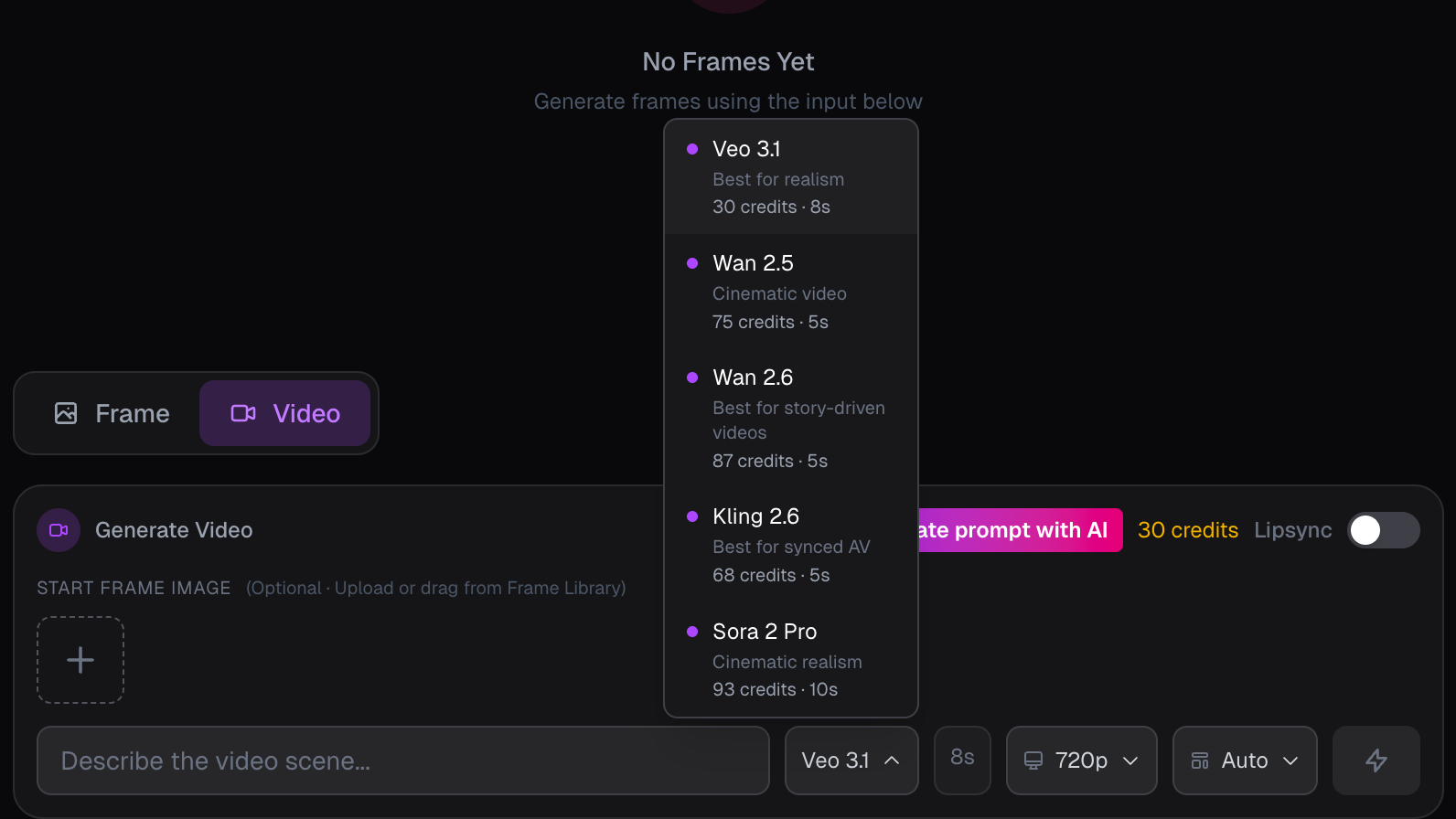
BeatViz Custom Mode now supports three new video generation models:
- •Kling 2.6 – Best-in-class audio-visual synchronization
- •Sora 2 Pro – Realistic motion, refined physics, cinematic quality
- •Wan 2.6 – Affordable multi-shot generation with stable characters
Each model is optimized for different creative needs, allowing BeatViz to function as a more flexible and professional AI Music Video Generator.
Which AI Video Model Should You Choose?
Choosing the right model can significantly improve your final result. Here's a clear breakdown of what each model does best.
Kling 2.6 – Best for Audio-Visual Synchronization
Kling 2.6 is an advanced audio-visual generation model designed for projects where sound and visuals must stay perfectly in sync.
It can generate video, speech, ambient sound, and sound effects directly from text or image inputs, making it ideal for music-driven content.
Why use Kling 2.6?
- ✓Native audio-video synchronization
- ✓Strong alignment with vocals and rhythm
- ✓Excellent for beat-driven visuals and lip-sync scenarios
Best for:
- →AI music videos with vocals or rap
- →Rhythm-heavy tracks
- →Creators who prioritize precise audio timing
If your music video depends on tight synchronization between sound and visuals, Kling 2.6 is the most reliable choice in BeatViz.
Sora 2 Pro – Best for Cinematic Motion & Realism
Sora 2 Pro is an upgraded video model focused on realistic motion, refined physics, and natural scene dynamics.
It supports text-to-video and image-to-video generation up to 15 seconds in 1080p HD, producing smooth, cinematic results with native audio synchronization.
Why use Sora 2 Pro?
- ✓More realistic movement and physical interactions
- ✓Cinematic camera behavior
- ✓High-quality 1080p output
Best for:
- →Story-driven music videos
- →Emotional or atmospheric visuals
- →Cinematic intros and highlight sequences
For creators aiming to elevate their AI music videos with realism and film-like motion, Sora 2 Pro delivers a premium visual experience.
Wan 2.6 – Best Value for Multi-Shot Music Videos
Wan 2.6, developed by Alibaba, is a cost-effective AI video model that excels at multi-shot generation while maintaining character consistency and visual stability.
Through the Wan 2.6 API, BeatViz supports text-to-video (T2V), image-to-video (I2V), and reference-guided generation, allowing you to create cinematic sequences efficiently.
Why use Wan 2.6?
- ✓Affordable 1080p video generation
- ✓Stable characters across multiple shots
- ✓Consistent visuals with improved motion logic
Best for:
- →Multi-scene music videos
- →Budget-conscious creators
- →Rapid testing of visual styles
Wan 2.6 is the ideal choice when you need reliable results at scale without sacrificing quality.
How These Models Improve AI Music Video Creation
With these three models, BeatViz Custom Mode becomes more than just a generator — it becomes a creative control system.
Creators can now:
- •Match video style to music genre
- •Reduce manual editing and re-syncing
- •Choose models based on budget and visual goals
- •Produce consistent, production-ready results
This update transforms BeatViz into a more versatile and professional AI Music Video Generator for modern creators.
How to Use the New Models in BeatViz Custom Mode
Getting started is simple:
- 1.Upload your music track to BeatViz
- 2.Select Custom Mode
- 3.Choose one of the three video models
- 4.Define scene timing and visual prompts
- 5.Generate, review, and refine your video
You can experiment with different models to discover which one best matches your creative vision.
Final Thoughts
This update marks an important step in BeatViz's mission to empower music creators with smarter, more controllable AI tools.
By adding Kling 2.6, Sora 2 Pro, and Wan 2.6, BeatViz offers creators the flexibility to balance quality, realism, and cost — all within a single AI Music Video Generator platform.
We're excited to see what you create next.