How to Make an AI Music Video from Any Song Online
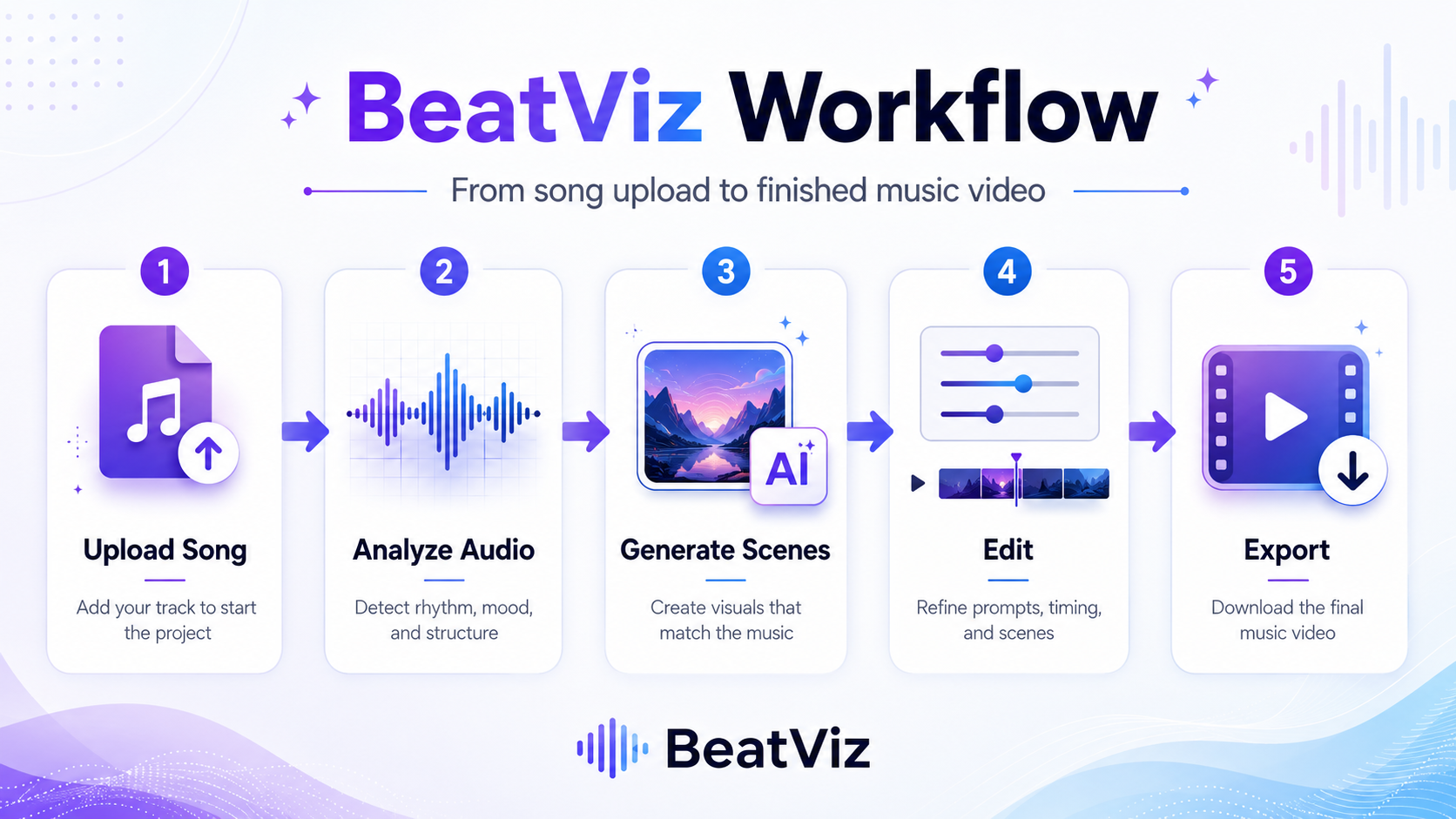
Creating a music video used to mean hiring a director, planning a shoot, editing footage, syncing cuts to the beat, and preparing different exports for every platform. Today, an AI music video generator can help musicians and creators make an AI music video from almost any song online, without starting from a blank timeline.
The goal is not just to add a moving background behind your track. A strong AI music video should understand the mood of the song, match the energy of the beat, support the lyrics or story, and create visual scenes that feel intentional. In this guide, you will learn how to go from a finished song to a publish-ready AI music video step by step.
What You Will Create
By the end of this workflow, you should have a complete AI-generated music video built from your own audio. Depending on your goal, that could be:
- •A full horizontal video for YouTube.
- •A vertical short clip for TikTok, Instagram Reels, or YouTube Shorts.
- •A lyric-driven video for a new release.
- •A cinematic visual story for an AI-generated song.
- •A teaser or hook clip for song promotion.
If you want a music-first workflow, you can start with an AI music video generator like BeatViz. BeatViz is designed around songs, rhythm, visual scenes, and editing control — instead of forcing you to build every shot manually from a generic text-to-video prompt.
What You Need Before Starting
Before you make an AI music video, collect your core creative materials first. The better your input is, the easier it is for AI to generate a video that feels connected to the track.
1. Your Song File
Start with the final version of your song whenever possible. A demo can work for testing, but a finished mix gives the AI a clearer sense of pacing, rhythm, intensity, and emotional direction.
Use the best-quality audio file you have available. If you are making a video for a release, avoid uploading a rough draft that may change later. A different final mix may affect the timing of the scenes, especially if the intro, chorus, or ending changes.
2. Lyrics or Song Meaning
Lyrics are extremely useful even if you do not plan to show text on screen. They help you turn the song into a visual story.
For example, a sad breakup song may need empty streets, soft lighting, close-up emotional shots, or slow cinematic movement. A high-energy EDM track may need fast camera motion, neon lights, crowd scenes, or abstract rhythm visuals.
Example:
"This is a dark electronic track about escaping a futuristic city at night. The video should feel cinematic, cyberpunk, tense, and fast-moving."
3. Cover Image or Reference Style
A cover image, artist photo, mood board, or style reference can help keep the visuals more consistent. You do not need a full storyboard, but you should know the basic visual direction before generating.
Useful references include:
- •Album cover art.
- •Artist branding.
- •A color palette.
- •A character reference.
- •A location or visual world.
- •A music video style you like.
This is especially important if you want the AI music video to match an existing release campaign.
4. Target Platform
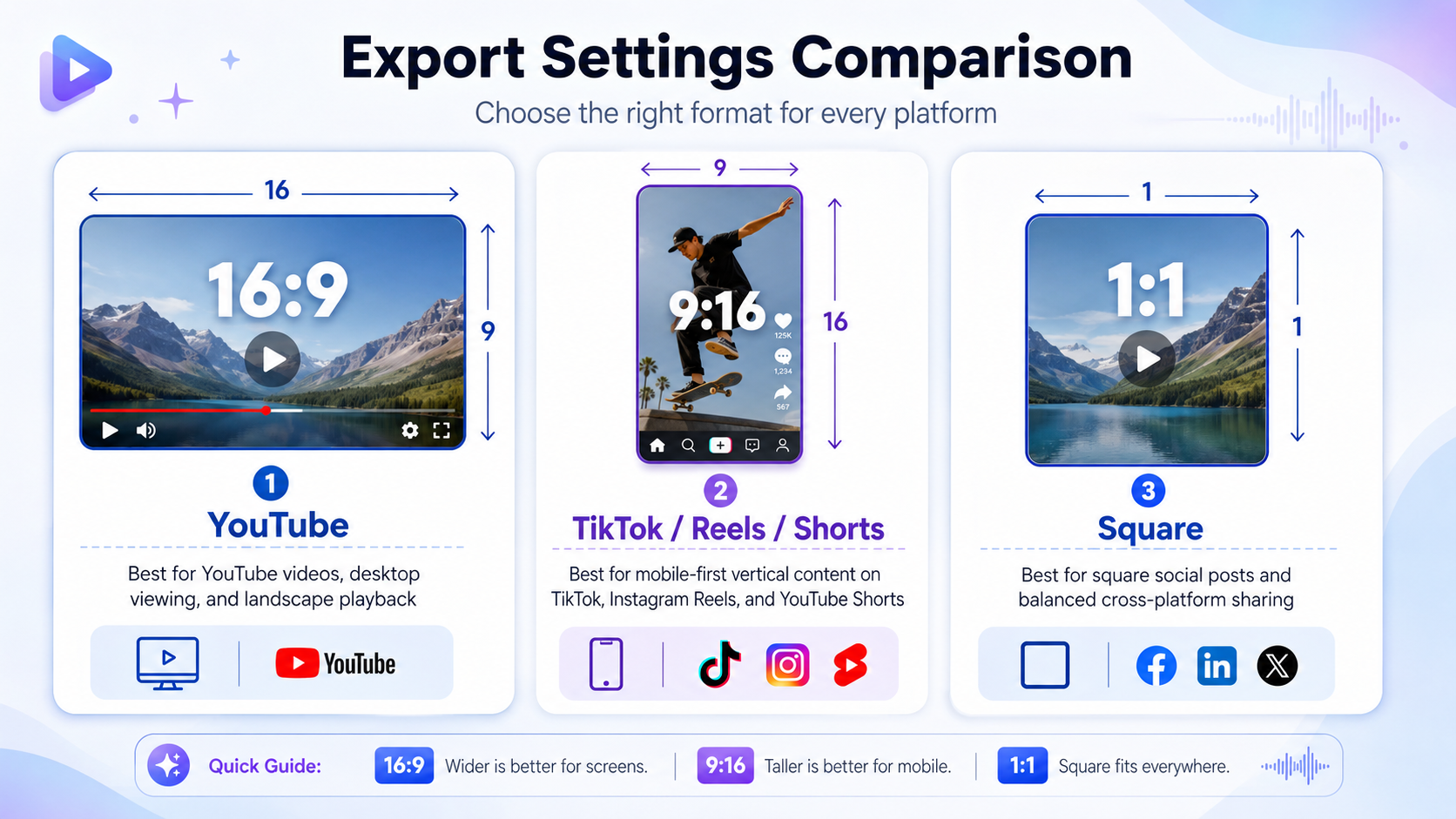
Decide where you want to publish before you generate the final version. YouTube's standard desktop aspect ratio is 16:9, while vertical formats are more suitable for Shorts-style and mobile-first distribution.
For TikTok, vertical 9:16 is the recommended format for in-feed videos. Instagram Reels support aspect ratios between 1.91:1 and 9:16.
A simple rule: use 16:9 for YouTube music videos, and 9:16 for TikTok, Reels, and Shorts.
Step 1: Upload or Prepare Your Song
The first step is to upload your audio into an AI music video generator. In BeatViz, you can start from the Create AI Music Video page and begin a new project from your song.
Before uploading, listen to the track one more time and mark the important sections:
- •Intro.
- •First verse.
- •Pre-chorus.
- •Chorus.
- •Drop.
- •Bridge.
- •Outro.
You do not need to write a technical music analysis. Just knowing where the emotional changes happen will help you make better creative decisions later. For example, you may want a slow scene during the intro, a character reveal in the first verse, a big visual shift at the chorus, and faster cuts during the drop.
Step 2: Choose a Visual Direction
A common mistake is uploading a song and writing a vague prompt like "make a cool music video." That gives the AI too much room to guess.
Instead, choose a clear visual direction before generation. You can define it with four simple elements:
- →Genre: pop, rap, EDM, rock, cinematic, lo-fi, metal, trap, folk.
- →Mood: dreamy, dark, emotional, energetic, romantic, surreal, nostalgic.
- →World: city, desert, concert stage, futuristic lab, ocean, bedroom, abandoned road.
- →Visual style: cinematic, anime, cyberpunk, documentary, 3D, realistic, abstract.
Here is a better prompt structure:
"Create a cinematic AI music video for a melancholic pop song. The story follows a lonely singer walking through a rainy neon city at night. Use slow camera movement during the verses and brighter, emotional visuals during the chorus. Keep the color palette blue, purple, and silver."
This kind of prompt gives the AI a real creative direction. It also helps you judge the output later because you have a clear target.
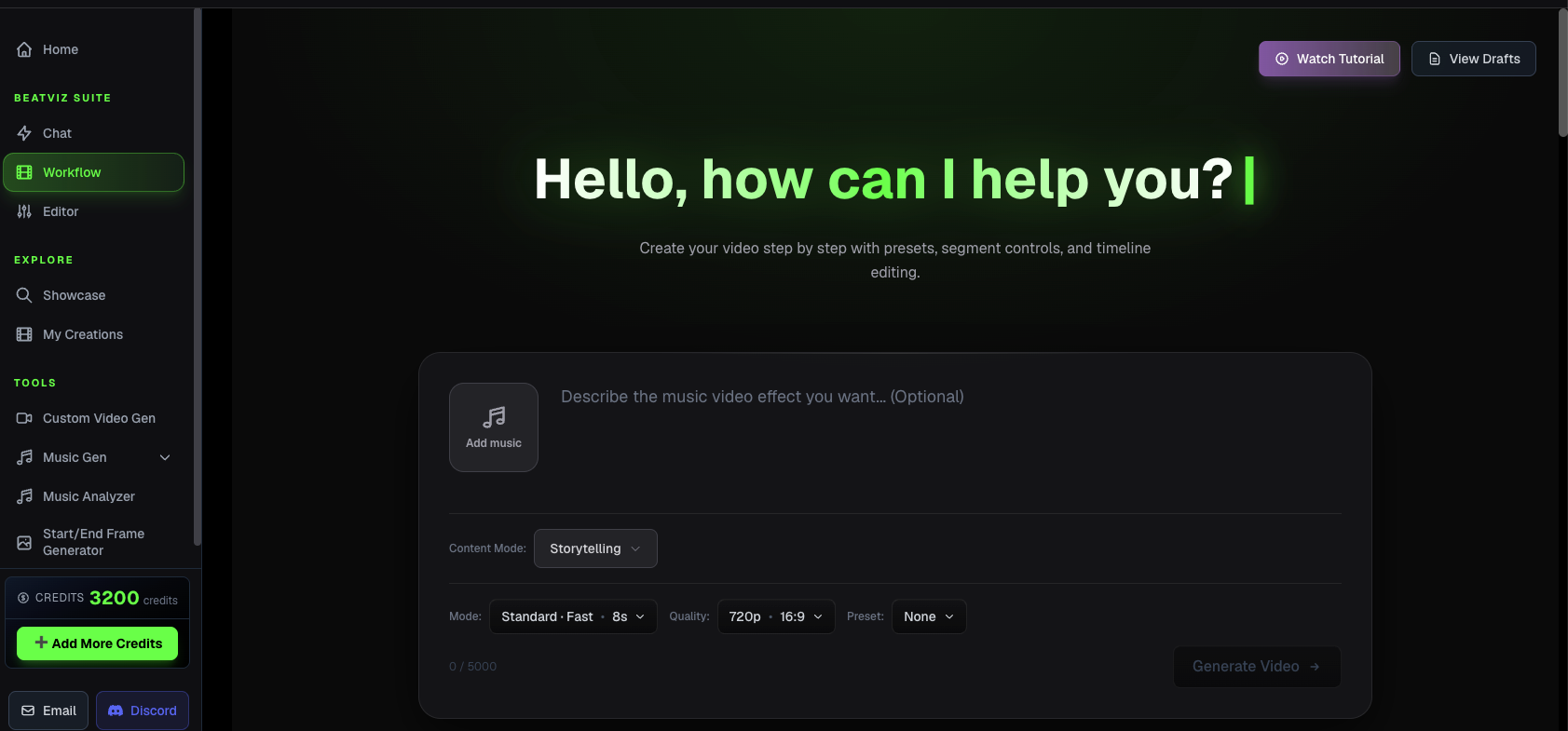
Step 3: Generate Scenes with an AI Music Video Generator
After your audio and visual direction are ready, generate the first version of the music video. A good AI music video workflow should help with audio analysis, scene generation, visual rhythm, and editing.
During this step, do not expect the first generation to be perfect. Treat it like a first cut — your goal is to create a complete draft you can review from beginning to end.
As you watch the first version, ask yourself:
- ✓Does the intro fit the mood of the song?
- ✓Does the chorus feel bigger than the verse?
- ✓Are the visuals changing at the right moments?
- ✓Do the scenes match the lyrics or emotional direction?
- ✓Does the character, setting, or style stay reasonably consistent?
- ✓Would this video make sense to someone hearing the song for the first time?
If the answer is mostly yes, you have a strong base. If not, adjust the prompt, regenerate weak parts, or simplify the visual concept.
Step 4: Review and Regenerate Weak Parts
The editing stage is where your AI music video becomes much stronger. Many creators accept the first full output even when some sections are weak — don't make that mistake.
Watch the video once without stopping. Then watch again and mark the parts that need improvement.
Common weak parts include:
- •A scene that does not match the lyric.
- •A visual style that suddenly changes.
- •A character that looks inconsistent.
- •A chorus that feels too flat.
- •A random image that does not belong to the story.
- •A section where the motion feels too slow for the beat.
Instead of regenerating the entire video, fix the weakest sections first. BeatViz's Custom Editing Studio lets you generate, rearrange, and refine clips scene by scene inside a timeline-based workspace — one of the biggest advantages of using a music-first AI workflow.
Step 5: Add Lyrics, Titles, or Text Only Where Needed
Not every AI music video needs on-screen lyrics. Sometimes cinematic visuals are enough. But if the hook or chorus is important for social media, text can help viewers remember the song.
Use lyrics when:
- •The chorus has a strong, memorable phrase.
- •The song is emotional and lyric-driven.
- •You are making a teaser for TikTok or Reels.
- •The audience may watch without full attention.
Avoid putting too much text on screen. A lyric video should still feel like a music video, not a karaoke file. Use short lines, readable fonts, and enough contrast between text and background.
For short-form content, consider showing only the strongest lyric line or hook. That can make the clip easier to understand in the first few seconds.
Step 6: Export for YouTube, TikTok, Reels, or Shorts
Before exporting, choose the version that matches your platform. For a full YouTube music video, 16:9 is the safest choice. For TikTok, Reels, and Shorts, create a 9:16 vertical version — this fills the mobile screen and works better for short-form discovery.
Recommended export planning:
- →YouTube full video: 16:9, full song length.
- →TikTok teaser: 9:16, strongest 10–30 seconds.
- →Instagram Reels: 9:16, chorus or visual hook.
- →YouTube Shorts: 9:16, short section with a clear payoff.
- →Square preview: 1:1 for flexible feed posts.
If you are promoting a song, do not create only one asset. One song can become a full YouTube video, a chorus teaser, a lyric hook, a vertical performance clip, and a release announcement — all from the same source.
Common Mistakes to Avoid
Using a Prompt That Is Too Abstract
"Make it cool" is not enough. Give the AI a genre, setting, mood, and visual style.
Better:
"Create a fast-paced cyberpunk performance video for an energetic trap song, with neon streets, handheld camera motion, and dramatic lighting."
Ignoring the Song Structure
A music video should not feel the same from beginning to end. Let the visuals rise and fall with the song — make the chorus more intense, the bridge more emotional, and the intro more atmospheric.
Choosing the Wrong Aspect Ratio
If your goal is TikTok or Reels, do not create only a horizontal video. If your goal is YouTube, do not rely only on a vertical short. Plan the format before generation.
Adding Too Many Ideas
A three-minute song does not need ten unrelated visual worlds. Keep one core concept and let it evolve.
Skipping the Review Stage
AI can speed up production, but you still need creative judgment. Review the output, regenerate weak scenes, and make sure the final video truly supports the song.
Final Workflow Checklist
Use this checklist before publishing:
- ✓Your final audio file is uploaded.
- ✓The visual direction is clear.
- ✓The video matches the song mood.
- ✓The chorus or drop has stronger visuals.
- ✓Weak scenes have been regenerated.
- ✓Text or lyrics are readable.
- ✓The export ratio matches the platform.
- ✓You have at least one short-form version for promotion.
- ✓You have a clear title, description, and call to action.
If you want to start quickly, open BeatViz, upload your song, describe your visual idea, and create a music-first video instead of editing everything manually.
FAQ
Can I make an AI music video from any song?
Yes, in most cases you can make an AI music video from your own song, an AI-generated track, or an audio file you have the rights to use. For public publishing, make sure you own or have permission to use the music.
Do I need editing experience?
No. An AI music video generator handles much of the scene creation and visual planning. However, you should still review the output and regenerate weak parts when needed.
What is the best format for an AI music video?
For YouTube, use 16:9. For TikTok, Instagram Reels, and YouTube Shorts, use 9:16 vertical. If you want to promote one song across platforms, create both versions.
Should I include lyrics in the video?
Include lyrics if the song is lyric-driven or if you want viewers to remember a hook. For cinematic or instrumental tracks, lyrics may not be necessary.
Is an AI music video generator better than a music visualizer?
It depends on your goal. A music visualizer is useful for simple reactive graphics, waveforms, or background motion. An AI music video generator is better when you want scenes, story, characters, mood, and platform-ready video assets.
How many versions should I create from one song?
At minimum, create one full version and one short vertical version. For a release campaign, you can also create a lyric clip, chorus teaser, countdown video, and behind-the-song visual.