What Is an AI Music Video Generator? Complete Guide for Musicians and Creators
An AI music video generator is a tool that helps musicians, producers, labels, and content creators turn a song into a visual video using artificial intelligence. Instead of starting from a blank editing timeline, you can upload audio, describe a visual direction, generate scenes, review the result, and export a video for platforms like YouTube, TikTok, Instagram Reels, or Shorts.
For artists who already have the song but do not have a video team, this changes the workflow. A music video no longer has to begin with a camera crew, a studio, actors, lighting, editing software, and weeks of production planning. With the right AI music video generator, the process can start directly from the track itself.
Quick Answer: What Is an AI Music Video Generator?
An AI music video generator is software that uses AI to create video scenes, visual styles, motion, lyrics, or story-based visuals around a music track. A good AI music video generator does more than create random clips. It should understand the song's mood, rhythm, lyrics, structure, and intended platform so the final video feels connected to the music.
In simple terms, it helps you move from "I have a song" to "I have a video I can publish." That makes it different from a basic AI video generator, which usually starts from a text prompt, and different from a music visualizer, which often creates waveform-style animations that react to sound.
How an AI Music Video Generator Works
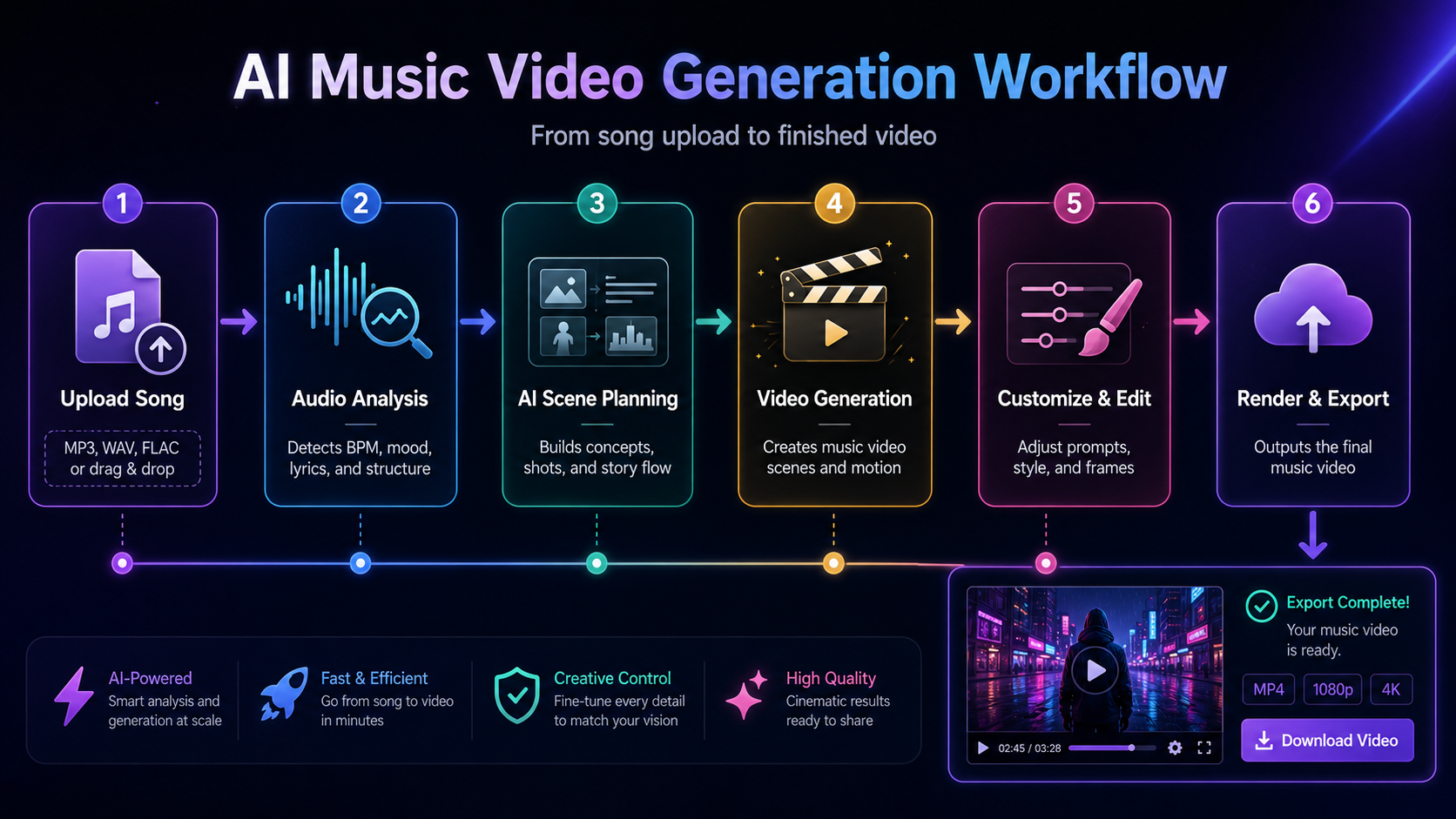
Most AI music video generators follow a workflow that combines audio analysis, creative direction, scene generation, and editing. The exact interface depends on the product, but the overall process usually looks like this.
1. Upload or Prepare Your Song
The first input is usually your audio file. This could be a finished single, a demo, an instrumental, a Suno or Udio track, a rap verse, an EDM track, a lo-fi beat, or a song exported from your DAW.
Some tools may also ask for lyrics, cover art, reference images, or a short creative brief. These extra inputs help the AI understand what the video should feel like. For example, a dark cinematic rap track may need very different visuals from a bright dance-pop chorus. The more clearly you define the mood, the easier it is to create visuals that support the song.
2. Analyze the Audio
A music-first AI video workflow should treat the song as the center of the project. That means the tool should pay attention to rhythm, energy, BPM, chorus changes, drops, vocal moments, emotional shifts, and scene transitions. This matters because music videos are not just moving pictures with a song placed underneath. Good music videos feel timed — a visual cut, camera movement, lyric moment, or character action should match the energy of the track.
3. Choose a Visual Direction
Next, the creator defines the style. This might include:
- •Cinematic narrative
- •Performance-inspired video
- •Lyric-driven music video
- •Animated character story
- •Abstract rhythm visuals
- •Fantasy, sci-fi, anime, retro, urban, or documentary style
- •Vertical short-form style for TikTok, Reels, and Shorts
This is where the creator's taste still matters. AI can generate options, but the artist still decides what world the song should live in.
4. Generate Scenes
After the song and visual direction are prepared, the AI generates video scenes. Some tools create short clips first. Others divide the song into sections, such as intro, verse, chorus, bridge, and outro.
A stronger workflow lets creators review scenes instead of accepting the first result. This is important because AI video is creative, but not always perfect on the first generation. You may need to regenerate a weak section, adjust a prompt, change a character direction, or simplify a visual idea.
5. Review, Edit, and Export
The final step is editing and export. A creator may need one version for YouTube in 16:9, another vertical version for TikTok or Reels in 9:16, and maybe a shorter hook clip for promotion. This is why an AI music video generator should not only generate visuals. It should also support a practical publishing workflow.
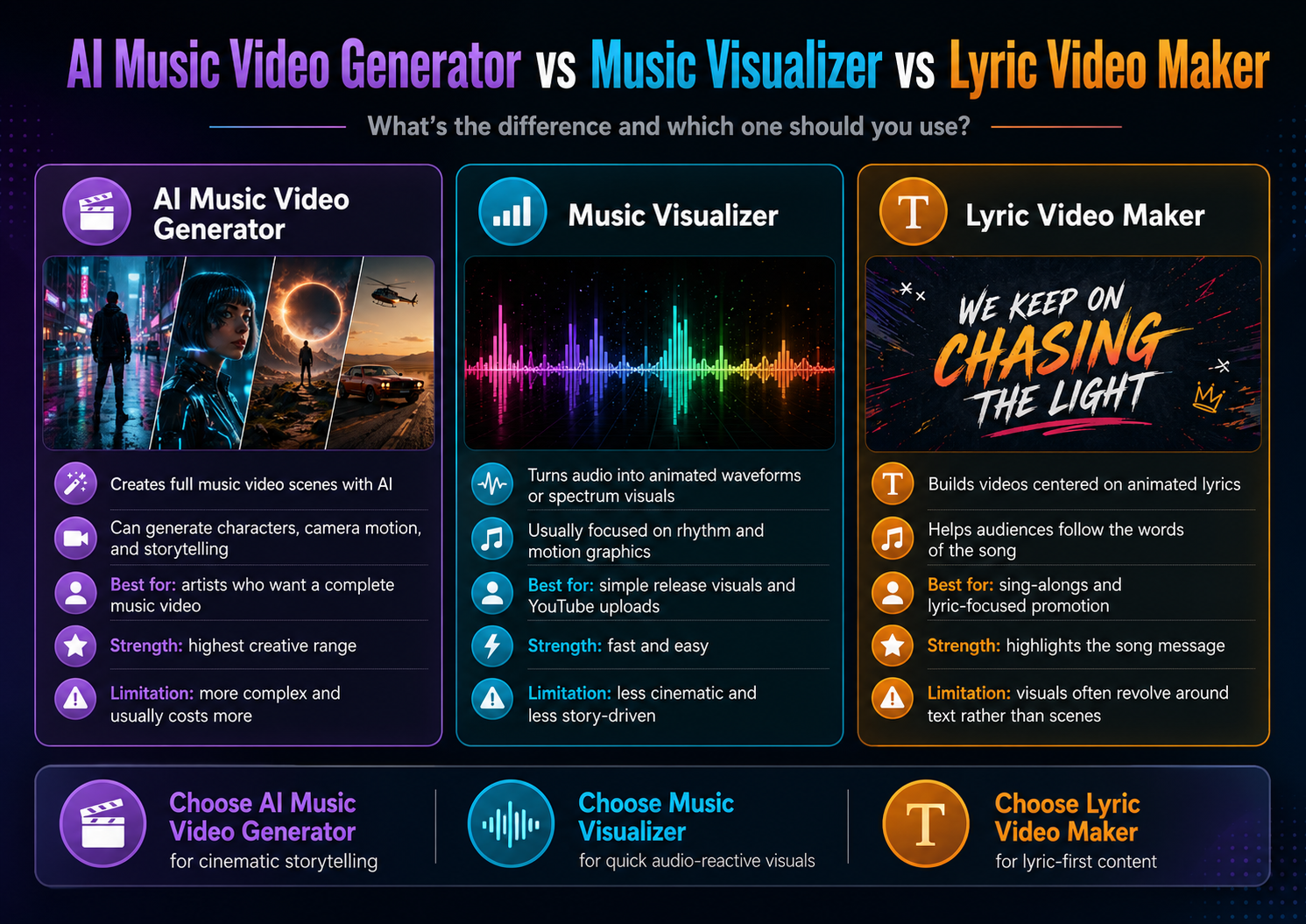
AI Music Video Generator vs Music Visualizer vs Lyric Video Maker
These tools often get mixed together, but they solve different problems. Understanding the difference helps you choose the right workflow.
| Tool Type | What It Usually Creates | Best For | Main Limitation |
|---|---|---|---|
| AI Music Video Generator | Full video scenes based on song, mood, lyrics, story, or style | Musicians who want a complete music video or promotional clips | Needs clear creative direction and review |
| Music Visualizer | Waveforms, spectrum animations, audio-reactive graphics, loops | Simple YouTube uploads, beat videos, background visuals | Usually limited storytelling and scene variety |
| Lyric Video Maker | Text-based video synced to lyrics | Songs where lyrics are the main focus | May feel simple if visuals are only text overlays |
| General AI Video Generator | Short AI clips from text or image prompts | Concept shots, ads, scenes, experiments | Often not built around full song structure |
A music visualizer is useful when you only need motion around the audio. For example, if you want a simple waveform behind your track, a visualizer may be enough.
A lyric video maker is useful when the words are the center of the experience. If your audience needs to read and sing along, lyrics should be clear and well-timed.
An AI music video generator is the better choice when you want something closer to a complete music video: scenes, mood, camera direction, characters, story, lyrics, and social-ready exports.
Who Should Use an AI Music Video Generator?
AI music video generators are useful for different types of creators, especially when time, budget, or production resources are limited.
Independent Musicians
Independent artists often need visuals for new releases but may not have the budget for a traditional music video. An AI music video generator can help them create official videos, lyric videos, teaser clips, and social assets without hiring a full production team. This is especially useful during release week, when one song may need multiple pieces of content.
Producers and Beat Makers
Producers can use AI-generated videos to showcase beats, instrumentals, sample packs, or collaborations. Instead of uploading a static cover image, they can create moving visuals that match the energy of the track. For beat makers posting on YouTube or social platforms, this can make each upload feel more polished.
AI Music Creators
Creators using tools like Suno, Udio, or other AI music platforms often face the same problem: the song is finished, but there is no visual identity around it. An AI music video generator helps turn AI-generated music into something that looks more complete and shareable.
Labels and Agencies
Labels, artist managers, and marketing agencies may need to create multiple video assets for one campaign. A full release may require an official video, vertical teasers, lyric clips, countdown posts, and short-form hooks. AI can help teams move faster, especially during the early creative stage or when testing different visual directions.
Social Media Creators
TikTok, Reels, and Shorts are visual platforms. If a creator wants to promote a song, a strong short video can help the track feel more memorable. AI-generated music videos can turn a hook section into a visual moment that is easier to post, test, and repurpose.
Common AI Music Video Workflows
There are several ways to use an AI music video generator, depending on your goal.
Workflow 1: Full Song to Complete Music Video
This is the main workflow for artists who want a full visual version of their track. A basic process: upload the song, add lyrics or a short description, choose a visual style, generate scenes for each section, review and regenerate weak parts, then export the final video. This workflow is best for artists who want a YouTube-ready music video or a visual centerpiece for a release.
Workflow 2: Song to Short-Form Promo Clips
Instead of generating a full video first, you can start with the strongest 15–30 seconds of the song — usually the chorus, drop, or most memorable lyric. The goal is to create a vertical video that works as a hook on TikTok, Reels, or Shorts. Short-form platforms reward immediate attention, and a strong AI-generated opening shot can make the song feel more interesting before the listener even understands the lyrics.
Workflow 3: Lyric-Focused Music Video
Some songs need the lyrics to lead. In this workflow, the creator prepares clean lyrics, decides where text should appear, and generates visuals that do not compete with readability. The best lyric videos do not just place words over random backgrounds — they use mood, pacing, typography, and scene design to make the lyrics feel emotional.
Workflow 4: Visual Concept Testing
Before spending money on a full production, an artist can use AI to test visual ideas: Should this track feel dark and cinematic? Should it use a lonely city at night? Should the character be performing or moving through a story? Should the video be realistic, animated, surreal, or abstract? This makes AI useful not only for final videos, but also for creative planning.
What to Look for in a Good AI Music Video Generator
Not every AI video tool is built for songs. If your goal is to create music videos, you should evaluate tools based on music-specific needs.
Music-First Workflow
A good AI music video generator should start from the song, not only from a prompt. Music has structure — intros, verses, choruses, bridges, drops, and outros. The tool should help the visuals follow that structure. This is where a music-first tool like BeatViz is different from a generic AI video generator. BeatViz is designed around audio-driven creation, so the workflow begins with the track and builds visuals around the rhythm, mood, and creative direction.
Scene Control
AI generation is more useful when you can guide it. Look for tools that let you adjust prompts, style, characters, mood, or scene direction. If the first result is not right, you should be able to refine it instead of starting from zero every time.
Support for Different Video Formats
A finished music video may need several exports: 16:9 for YouTube, 9:16 for TikTok and Reels, 1:1 for some social feeds, short clips for teasers, and longer versions for official releases. A practical tool should support the way creators actually publish.
Lyric and Story Support
For many artists, the song is not just sound — it has a message. A good AI music video generator should help translate that message into visuals. This could mean lyric-friendly scenes, character continuity, emotional pacing, or visual changes that reflect different song sections.
Easy Review and Regeneration
AI video results can vary. That is normal. The important question is whether the tool gives you a simple way to review, regenerate, and improve weak sections. A creator-friendly workflow should make iteration part of the process.
Why BeatViz Fits the AI Music Video Generator Category
BeatViz is built for creators who want to turn songs into music videos instead of making generic AI clips. The workflow is centered on music upload, audio-driven analysis, visual direction, scene generation, review, and export. That makes it a good fit for:
- •Musicians creating release visuals
- •Producers promoting beats
- •AI music creators turning generated songs into videos
- •Social media creators making short-form music content
- •Teams that need repeatable video assets for campaigns
BeatViz should not be seen as a replacement for every kind of professional music video production. A large-budget shoot with actors, locations, choreography, and a full crew still has its place. But for creators who need a faster way to go from song to publish-ready visuals, BeatViz gives them a music-first workflow that is more focused than a general AI video tool and more complete than a basic visualizer.
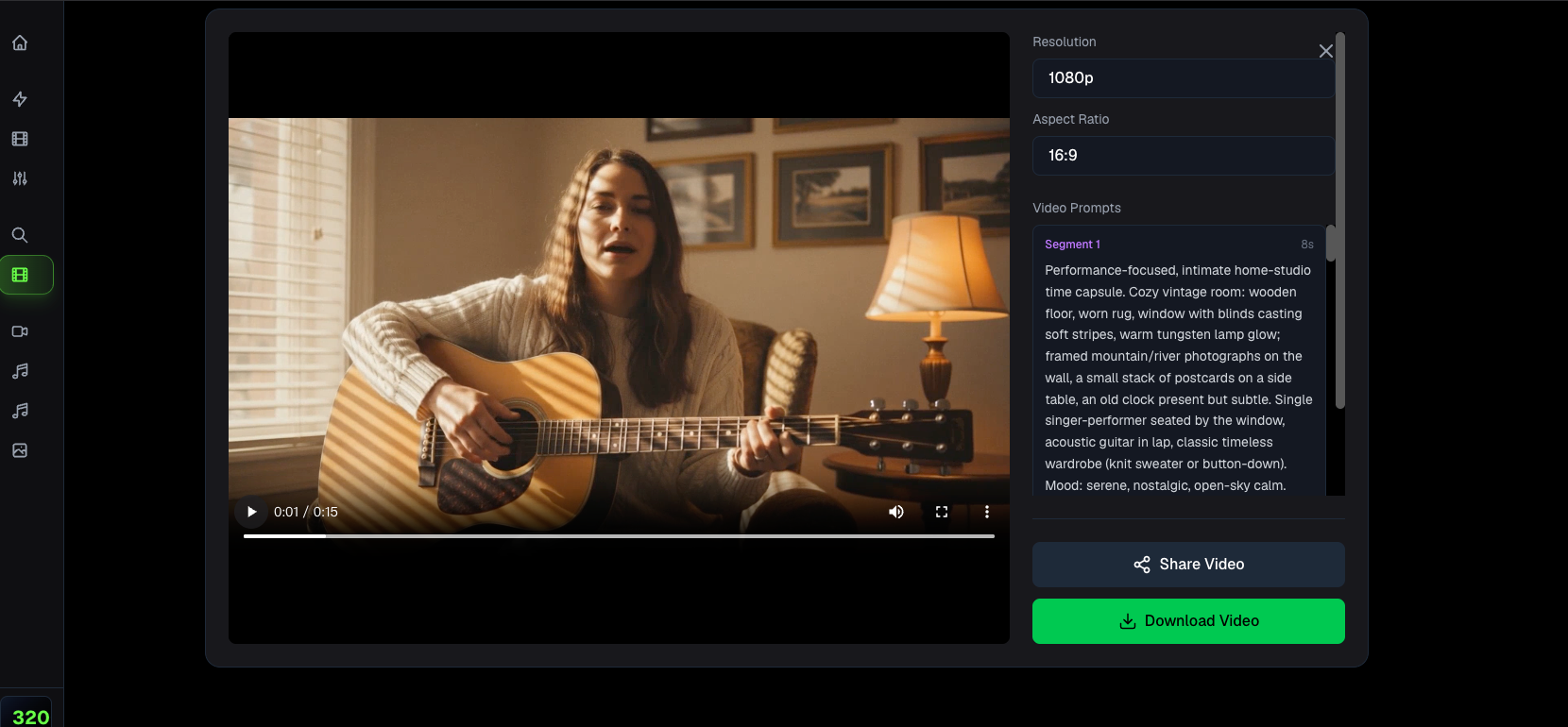
Want to turn your song into a complete AI music video? Try BeatViz and create your first video from audio in minutes.
AI Music Video Generator FAQ
What is an AI music video generator?
An AI music video generator is a tool that uses artificial intelligence to create video visuals for a song. It can help generate scenes, styles, lyrics-based visuals, or short promotional clips based on audio, prompts, lyrics, or reference images.
Can AI make a music video from a song?
Yes. AI can help turn a song into a music video by analyzing the audio, following a creative prompt, generating scenes, and helping the creator export a finished video. The best results usually come when the user gives clear direction about style, mood, story, and platform.
Is an AI music video generator the same as a music visualizer?
No. A music visualizer usually creates audio-reactive graphics, such as waveforms, spectrum animations, or looping backgrounds. An AI music video generator is broader — it can create scenes, characters, story moments, lyric-friendly visuals, and social-ready video formats.
Is an AI music video generator good for independent artists?
Yes. Independent artists can use AI music video generators to create release visuals, lyric videos, teaser clips, and short-form promotional content without needing a full production team. This is especially useful when working with limited time or budget.
What do I need before using an AI music video generator?
You should prepare your song file, lyrics if available, a short description of the mood, and any reference images or style ideas. If you already know the target platform, such as YouTube or TikTok, you should also decide the aspect ratio before generating.
Can I use an AI music video generator for TikTok, Reels, and Shorts?
Yes. Many creators use AI music video tools to create vertical short-form clips for TikTok, Instagram Reels, and YouTube Shorts. For best results, choose the strongest hook section of the song and generate visuals that are clear in the first few seconds.
What makes a good AI music video generator?
A good AI music video generator should understand music-first workflows, support audio upload, allow visual direction, provide scene review or regeneration, and export videos in practical formats. For musicians, the most important feature is not just video generation, but how well the tool connects visuals to the song.