How to Turn Music Into a Video With AI: Complete Guide

You have finished the song.
Now you need something people can actually watch.
Traditionally, turning music into a video meant planning a concept, hiring actors, finding locations, shooting footage, editing dozens of clips, syncing everything to the track, and spending days or weeks putting the final music video together.
AI changes that workflow.
Today, you can upload a finished song and use AI to help analyze the music, develop a visual concept, create characters and locations, plan scenes, generate shots, add motion, and assemble those shots into a complete music video.
The important part is understanding that turning music into video with AI is no longer just about generating random clips.
The best results come from treating AI more like a production team.
With the BeatViz AI music video generator, you can move from a finished audio track to a structured music video through Workflow, AI Director, or a timeline-based Editor — depending on how much creative control you want.
How BeatViz Turns Music Into Video With AI
The simplest version of an AI music video workflow sounds like this:
Upload a song, press Generate, and receive a video.
But making a good music video requires more structure.
A song changes constantly.
There are quiet verses, energetic choruses, instrumental sections, vocal moments, transitions, beat drops, bridges, and emotional peaks.
A useful AI music video system needs to understand those changes before deciding what should happen visually.
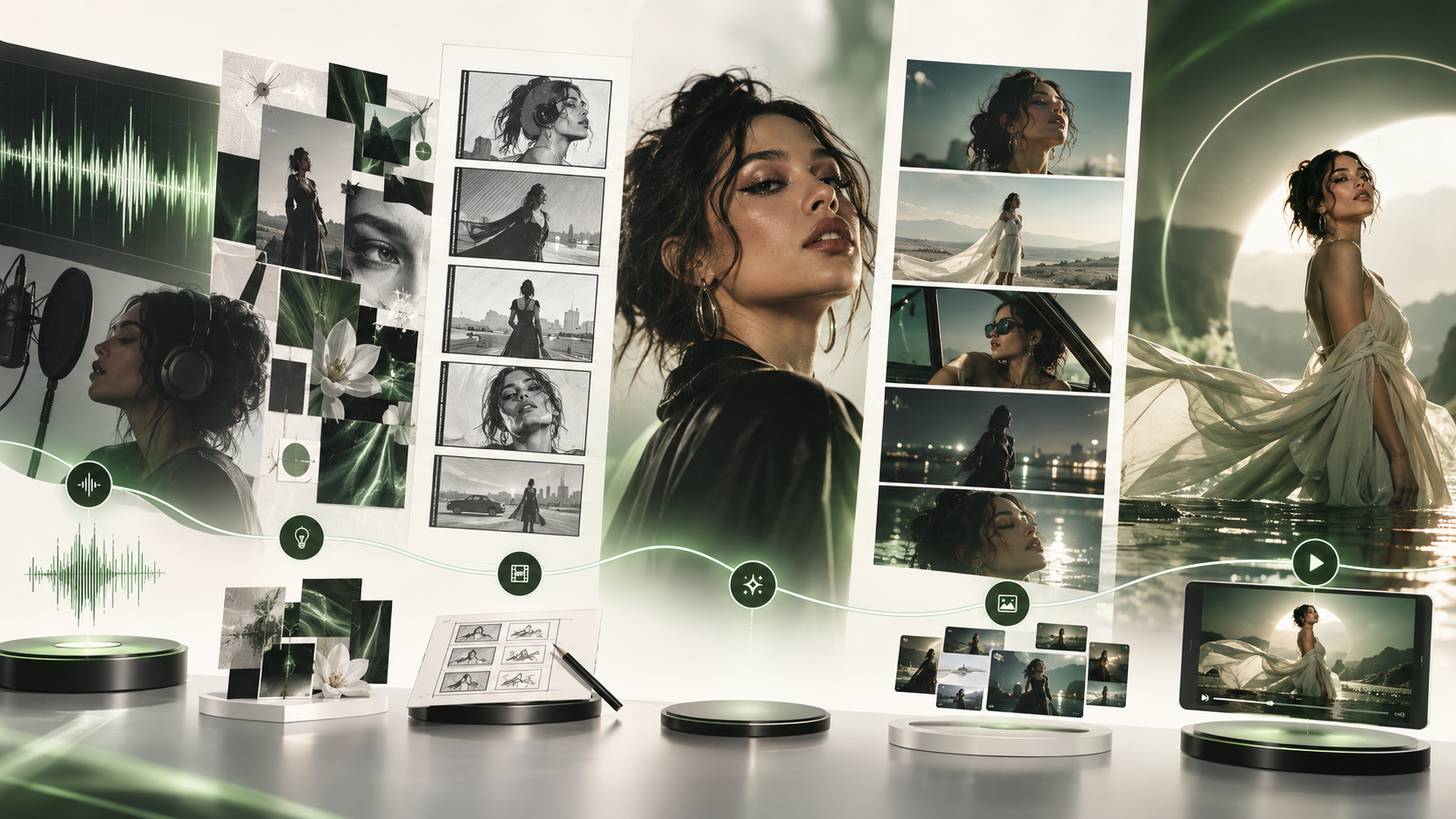
BeatViz approaches this as a complete production process.
Your song can move through stages such as:
Music → Analysis → Visual Direction → Characters → Scenes → Storyboard → First Frames → Video → Editing → Export
Instead of asking AI to immediately generate a long video, each stage gives you an opportunity to shape the result.
That matters because a music video is not simply a collection of attractive shots.
The character should remain recognizable.
Locations should feel connected.
The pacing should match the track.
Camera movement should make sense.
And the visual concept should survive for several minutes instead of falling apart after one impressive five-second clip.
What does AI analyze in a song?
When turning music into video, useful information can include the song's:
- •overall mood and genre
- •energy level
- •vocal sections
- •quieter and more intense moments
- •changes between sections
- •tempo and rhythm
- •possible visual themes
- •opportunities for performance, storytelling, or cinematic B-roll
The goal is not to create one visual that repeats throughout the entire track.
The goal is to build a visual structure that evolves with the music.

Want to see how your song translates visually?
Upload a finished track to BeatViz and let AI help turn its structure, mood, and energy into a visual concept before you start generating video.
Start Turning Your Music Into Video With BeatViz →3 Ways BeatViz Can Turn a Song Into an AI Music Video
Not every creator wants the same level of control.
Some musicians simply want to upload a finished track and get a complete visual concept.
Others already know exactly what their singer should wear, where the chorus should happen, or what camera movement they want during a specific moment.
That is why BeatViz provides three different ways to approach AI music video creation.
1. BeatViz Workflow: Let AI Build the Music Video With You
Workflow is designed for creators who want AI to guide the overall production process.
You start with the music.
BeatViz analyzes the track and helps develop visual directions around it.
From there, the workflow can move through characters, environments, scenes, segments, shots, first frames, video generation, and final assembly.
Instead of managing dozens of separate AI tools, you work through the project as one connected production.
This is especially useful if you know how you want your music to feel, but do not necessarily know how to translate that feeling into individual shots.
For example, you might start with:
A cinematic female pop music video with a nostalgic Y2K atmosphere, neon Tokyo streets, convenience stores, arcades, and energetic dance scenes.
That gives the AI a creative direction.
The workflow can then help turn that idea into individual visual moments across the song.
If you want a deeper walkthrough, read our full guide on how to make a music video with AI.
You can also start directly inside BeatViz Workflow.

2. BeatViz AI Director: Create a Music Video Through Conversation
Sometimes you do not want a fixed workflow.
You want to direct.
That is where the BeatViz AI Director becomes useful.
Instead of configuring every creative decision through menus, you can describe what you want conversationally.
For example:
Create a dreamy R&B music video set between a quiet apartment and a rainy city at night.
Then you can continue directing:
Keep the same female singer, but make the chorus more energetic.
Or:
Move the second chorus to a rooftop overlooking the city.
Or:
Make this shot a close-up and let the camera slowly push toward her face.
This approach is useful because real creative direction rarely happens in one perfect prompt.
You develop an idea.
You look at the result.
You change something.
Then you keep refining it.
An AI Director makes that process much closer to collaborating with a visual creative partner than filling out a traditional video-generation form.
It is especially useful for musicians who have strong ideas but do not want to learn complicated prompt structures or video-editing workflows.
Already know what your music video should feel like?
Describe the concept, change the scenes, adjust the character, and keep refining the idea through conversation.
Direct Your Music Video With BeatViz →3. BeatViz Editor: Build and Fix the Video Scene by Scene
Automation is useful for getting the first version of a music video.
But creative control becomes more important as you get closer to the final version.
Maybe 25 shots work perfectly, but one close-up looks wrong.
Maybe a character changes appearance halfway through the video.
Maybe you want lip sync only during a specific vocal section.
Maybe one scene should be eight seconds instead of five.
You should not have to regenerate the entire music video because one shot needs improvement.
The BeatViz Editor gives you more direct control over individual clips and the timeline.
You can work with individual scenes, replace clips, generate new shots, use different video models, add lip sync, and refine sections without rebuilding the whole project.
A useful way to think about it is:
Workflow gets you the first cut.
Editor helps you finish the final cut.

Not sure which BeatViz workflow to use?
Start with Workflow if you want AI to guide the complete production.
Use AI Director if you want to shape the video through conversation.
Open Editor if you want direct scene-by-scene control.
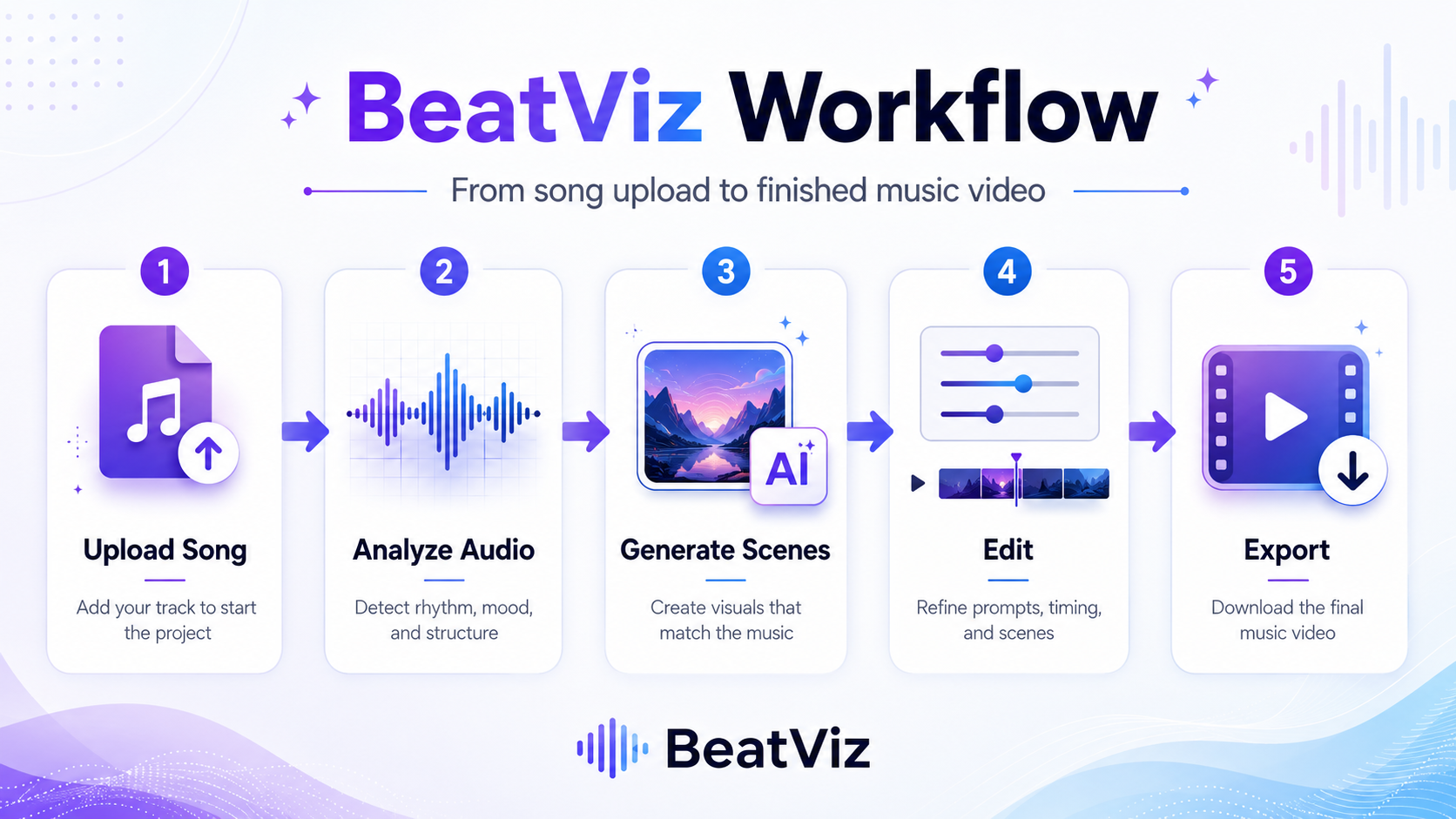
How to Turn Music Into a Video With BeatViz Step by Step
Now let's look at the actual process of turning a finished song into a complete AI-generated music video.
Step 1: Upload Your Song to BeatViz
Start with the finished audio track.
BeatViz supports common music formats, so you can work with songs exported from your DAW or tracks created with AI music tools.
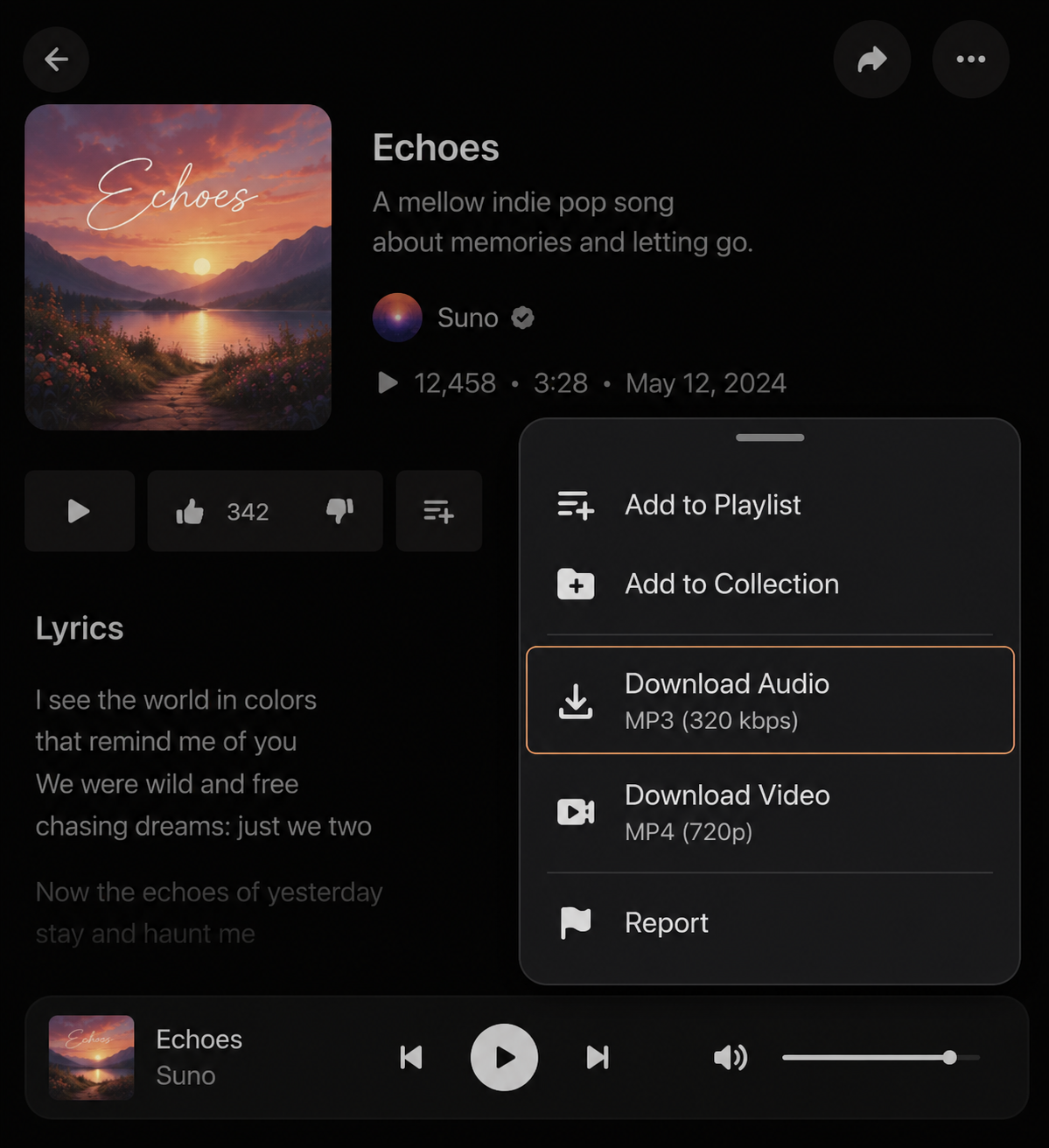
If you created a track in a service such as Suno, download the audio first and then import it into your music video project.
The quality of the finished music matters.
AI can create the visuals, but the song remains the foundation of the entire video.
If you are specifically working with AI-generated music, read our guide on how to turn a Suno song into an AI music video.
Step 2: Let BeatViz Analyze the Music
Before thinking about individual scenes, understand the song as a whole.
This is one of the biggest differences between creating isolated AI clips and producing an actual music video.
A three-minute song might contain several different visual opportunities.
A quiet introduction could use a slow establishing shot.
A verse might focus on the artist.
The chorus might move into a larger performance environment.
A bridge might become more emotional and cinematic.
The final chorus could bring several visual worlds together.
This creates progression.
Without progression, even beautiful AI footage quickly starts to feel repetitive.
Step 3: Choose a Visual Direction in BeatViz
Now decide what kind of world the song belongs in.
This does not mean choosing only an art style.
A strong visual direction should also answer questions such as:
- •Who is the main character?
- •Where does the video take place?
- •Is it performance-based or narrative?
- •Does the video stay inside one world or move between several locations?
- •What type of lighting fits the music?
- •How should the camera behave?
For example, instead of:
cinematic music video
try thinking in a more complete direction:
A cinematic alternative-pop video following one female artist through an empty hotel, a neon-lit street, and a rooftop at night. Moody blue-hour lighting, intimate close-ups, slow handheld camera movement, and occasional wide shots during the chorus.
The more coherent the concept is at this stage, the easier it becomes to maintain consistency later.
Step 4: Create Consistent Characters With BeatViz
Character consistency is one of the hardest parts of AI music video generation.
A single image can look amazing.
But if the singer suddenly has a different face, hairstyle, outfit, or age in the next shot, viewers notice immediately.
When creating your main artist or character, use a clear reference image whenever possible.
For better consistency:
- •Keep the main facial features recognizable.
- •Avoid changing hairstyles or outfits unless it is intentional.
- •Use one person per reference image when possible.
- •Make major creative decisions before generating dozens of clips.
If your music video uses two performers, define them clearly as separate characters rather than asking the model to improvise two identities repeatedly.
Step 5: Use BeatViz to Build Scenes Around the Song
Once the character and visual direction are clear, break the song into scenes.
One common mistake is changing the environment every few seconds simply because AI makes it easy to generate new places.
That can make the music video feel visually impressive but narratively random.
Instead, think in terms of visual worlds.
For example, a three-minute pop video might use only four major environments:
- •Apartment
- •Tokyo street
- •Arcade
- •Swimming pool party
The camera angles, framing, character position, movement, and lighting can change dozens of times inside those environments without requiring dozens of unrelated locations.
This gives the video variety while preserving a recognizable visual identity.
Why BeatViz Uses First Frames Before Video Generation
One of the most important stages in an AI music video workflow happens before the shot moves.
The first frame establishes what the video model is being asked to animate.
Check it carefully.
Look at:
- •the face
- •hair
- •clothing
- •body position
- •background
- •camera angle
- •composition
- •lighting
- •depth of field
If the first frame is wrong, generating motion from it usually does not solve the underlying problem.
Instead, fix the image first.
Then generate the video.
This approach can save credits and reduce unnecessary regeneration because you are solving visual problems earlier in the production process.
Think of the first frame like approving a shot before the camera starts rolling.

Build the shot before you animate it.
Start with your song, approve the visual direction and first frames, and only generate motion once the shot looks right.
Start Creating With BeatViz →How BeatViz Generates Motion That Feels Directed
Once the first frame looks right, motion becomes the next creative decision.
A weak video prompt often describes only what exists in the image.
For example:
Woman standing in the street.
A stronger video direction describes what changes over time:
The singer slowly walks toward the camera while the camera tracks backward. Her hair moves naturally in the wind. Neon signs reflect across the wet pavement. She briefly looks away before returning her gaze toward the lens.
The second version contains:
- •subject movement
- •camera movement
- •environment movement
- •timing
- •performance direction
These details help turn a static image into a shot.
For performance or dance scenes, describe body movement clearly rather than simply writing "she dances."
For example:
She performs a controlled jazz-pop sequence: stepping to the side, shifting her hips with the rhythm, sweeping one arm horizontally across her body, rotating her shoulders, and transitioning into a confident forward pose while the camera slowly circles around her.
The more intentional the movement feels, the less the final video resembles random AI animation.
How BeatViz Keeps an AI Music Video Consistent
The hardest part of creating an AI music video is usually not producing one beautiful clip.
It is producing 20, 30, or 40 clips that still feel like the same music video.
Consistency comes from repeating important creative decisions.
That means keeping control over:
- •character identity
- •wardrobe
- •locations
- •lighting
- •color palette
- •camera language
- •story progression
You can still create variety.
For example, the same singer can appear in:
- •a wide establishing shot
- •medium walking shot
- •close-up performance shot
- •profile shot
- •overhead shot
- •slow tracking shot
Those shots feel different without introducing an entirely different visual universe.
This is one reason it is useful to create a visual plan before generating every individual clip.
How to Add Lip Sync With BeatViz
Not every shot needs lip sync.
In fact, many professional music videos constantly alternate between performance and non-performance footage.
Use lip sync where viewers naturally expect to see the artist singing.
Close-ups, medium performance shots, and direct-to-camera scenes are usually good candidates.
For instrumental sections or visual transitions, cinematic B-roll can often work better.
Inside the BeatViz Editor, lip sync can be applied to selected vocal sections while the surrounding timeline continues using normal generated clips.
This approach also gives the video more visual rhythm than forcing the character to sing continuously for the entire song.
How BeatViz Helps Fix Weak AI Video Shots
AI generation is probabilistic.
Even with a strong image and prompt, not every shot will be perfect.
The important question is not:
Can AI generate every shot perfectly on the first attempt?
The better question is:
Can you quickly identify and replace the weak shots without rebuilding everything else?
That is where scene-level editing becomes important.
Imagine a finished project with 32 clips.
Twenty-eight work well.
Two need slightly better movement.
One close-up has an inconsistent face.
One transition does not fit the song.
Instead of regenerating the entire video, you can focus only on those four sections.
This is much closer to how real editing works.
A music video is rarely created perfectly in one pass.
It improves through revision.
BeatViz AI Music Video vs. Traditional Music Visualizer
A music visualizer and an AI music video are not the same thing.
Traditional visualizers usually react to audio using waveforms, particles, spectrum animations, looping backgrounds, or simple motion graphics.
They can be useful for quickly publishing a song.
But they usually do not contain characters, scenes, storytelling, performances, camera direction, or cinematic progression.
An AI music video can go much further.
Instead of only reacting to the sound, AI can help construct a visual interpretation of the song.
That might include:
- •an artist performing
- •characters interacting
- •multiple locations
- •narrative sequences
- •cinematic B-roll
- •dance scenes
- •close-ups
- •camera movement
- •visual transitions
If your goal is simply to upload music to YouTube, a visualizer may be enough.
If you want something closer to a traditional music video, an AI music video generator gives you much more creative flexibility.
How Much Does It Cost to Turn Music Into Video With BeatViz?
AI dramatically changes the economics of music video production.
Traditional production can involve cameras, locations, actors, lighting, makeup, transportation, post-production, and editing.
AI removes many of those physical production costs.
However, AI video is not free to generate.
The final cost depends heavily on:
- •the length of the song
- •number of video clips
- •video model used
- •resolution
- •number of regenerations
- •lip-sync duration
- •amount of experimentation
The biggest way to control cost is not simply choosing the cheapest model.
It is improving the workflow.
Approve the concept before generating scenes.
Approve first frames before generating motion.
Do not regenerate clips that already work.
Use higher-quality models only where the visual difference matters.
This is often more cost-effective than generating dozens of variations blindly.
If you already know your song length and target quality, you can compare BeatViz plans and generation options before starting your project.
Plan your music video before you start generating.
Compare BeatViz plans and choose the workflow and quality level that fits your project.
Turn Your Music Into a Video With BeatViz →Common Mistakes When Turning Music Into Video With BeatViz
The most common mistake is generating too quickly.
When every stage is treated as "just generate something," small inconsistencies accumulate until the finished music video feels artificial.
A better workflow is to make one important decision at a time.
- •Start with a clear concept.
- •Define the main character.
- •Limit the number of visual worlds.
- •Review first frames.
- •Describe movement rather than objects.
- •Use lip sync selectively.
- •Fix individual weak scenes instead of starting again.
Most importantly, remember that AI generation is only part of directing.
The quality of the final music video depends on the decisions connecting those generations together.
BeatViz FAQ: Turning Music Into Video With AI
Can AI turn an MP3 into a video?
Yes. An AI music video platform can use a finished audio track as the foundation for creating characters, environments, scenes, video clips, and a final edited music video. The result is different from a traditional audio visualizer because the AI can create actual cinematic scenes rather than simply animating waveforms.
Can I turn a Suno song into a music video?
Yes. Download your finished Suno song and import the audio file into BeatViz. From there, you can create the visual concept and generate the music video using Workflow, AI Director, or Editor.
Read the full tutorial here: how to turn a Suno song into an AI music video.
Do I need video-editing experience?
Not necessarily. BeatViz Workflow and AI Director are designed to handle much of the production process for you. If you want more detailed control, the Editor lets you work directly with individual scenes and the timeline.
Can AI make a full music video instead of one short clip?
Yes. The key is to treat the project as a sequence of coordinated scenes instead of trying to generate the entire song as a single video prompt. A complete AI music video can contain dozens of individual shots connected by a consistent character, visual direction, and story.
For a more detailed tutorial, read how to make an AI music video from any song.
Can I make vertical music videos for TikTok or Reels?
Yes. Different aspect ratios can be used depending on where the video will be published. A horizontal 16:9 version is usually suitable for YouTube, while 9:16 works better for TikTok, Instagram Reels, and YouTube Shorts.
What makes an AI music video look professional?
Professional-looking AI music videos usually have several things in common: consistent characters, controlled locations, intentional camera movement, clear visual direction, good pacing, and careful editing. The biggest difference is rarely one individual AI model. It is how the individual shots are directed and assembled.
Turn Your Next Song Into a Complete Music Video With BeatViz
Making music no longer has to stop when the audio is finished.
A song can become the starting point for an entire visual world.
With AI, musicians can now move from:
finished track → creative direction → characters → scenes → cinematic shots → complete music video
without building a traditional production team around every release.
And you do not have to give up creative control to gain speed.
Use BeatViz Workflow when you want AI to guide the complete process.
Use the AI Director when you want to develop the music video through conversation.
Use the Editor when you want scene-by-scene control over the final result.
The technology can generate the images and motion.
Your job is still the most important one:
deciding what the song should look like.
Your song is already finished. Now give it a visual world.
Upload your track to BeatViz and turn it into a complete music video with AI-generated concepts, characters, scenes, first frames, motion, lip sync, and editing — all in one connected workflow.
Turn Your Music Into a Video With BeatViz →